

TikTok Shop sellers, did you know that from 2nd September 2024, all your orders must be shipped within 1 working day from when the order was placed? Hence, as a TikTok Shop seller, you must comply with TikTok Shop’s latest order cycle timeline to ship your orders on time and continue to enjoy your seller privileges.
In the next few minutes, let us guide you through:
- TikTok Shop Latest Order Cycle Timeline
- How Does It Work?
- What Happens If You Ship Your Orders Late?
- Tips to Ship Your TikTok Shop Orders On Time
- Leverage Your TikTok Shop with SiteGiant
1. TikTok Shop Latest Order Cycle Timeline
Before reviewing the order cycle timeline, determine if your shipping type is ‘Ship by Seller’ or ‘Ship by TikTok.’ Once you have selected your shipping type, refer to the latest TikTok Shop Order Cycle Timeline below:
| Shipping Type | Order Cycle Timeline |
| Ship by Seller (This option is only available to selected sellers only) | All orders must be “Delivered” within 15 calendar days from order placement. |
| Ship by TikTok | For orders placed before 14:00H (2pm) All orders must be “Shipped” by 23:59H, 1 working day from when the order was placed. *Note: If the order is placed on a non-working day, then the order must be “Shipped” by 23:59H on the next working day. For orders placed after 14:00H (2pm) All orders must be “Shipped” by 23:59H, 2 working days from when the order was placed. (Effective from 2nd September 2024 onwards) All orders must be “Shipped” by 23:59H, 1 working day from when the order was placed. *Note: If the order is placed on a non-working day, then the order must be “Shipped” by 23:59H on the next working day. |
2. How Does It Work?
Let’s make it simple with three examples shown below:
| State | Excluded from Fulfilment Calculation |
| Sellers from other States (including Johor) | Saturday and Sunday |
| Sellers from the state of Kedah, Kelantan & Terengganu | Friday and Saturday |
| All Sellers | Public Holidays |
Example 1: Order Received on Weekdays

- A ready stock(s) order paid on Monday before 2:00 PM must be shipped out within 1 day from the paid date, which is Tuesday 11:59 PM.
- A ready stock(s) order paid on Monday after 2:00 PM must be shipped out within 2 days from the paid date, which is Wednesday 11:59 PM.
Example 2: Order Received on Weekends/Public Holidays
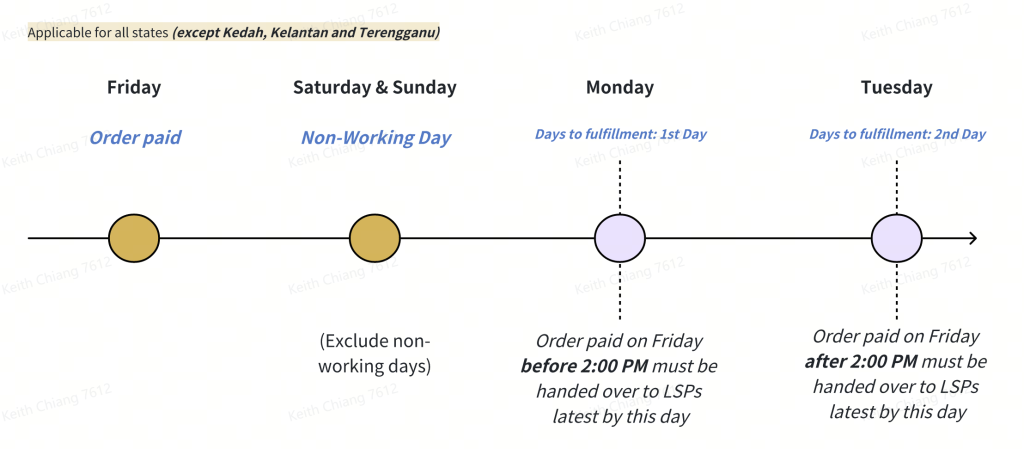
- A ready stock order(s) paid on Friday before 2:00 PM must be shipped out by the following Monday 11:59 PM.
- A ready stock order(s) paid on Friday after 2:00 PM must be shipped out by the following Tuesday 11:59 PM.
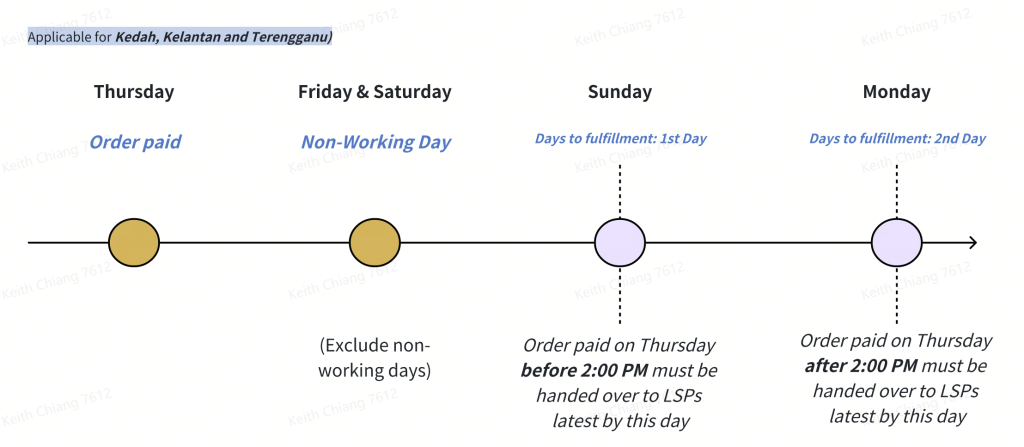
- A ready stock order(s) paid on Thursday before 2:00 PM must be shipped out by the following Sunday 11:59 PM.
- A ready stock order(s) paid on Friday after 2:00 PM must be shipped out by the following Monday 11:59 PM.
Example 3: Order Received on Non-Working Days
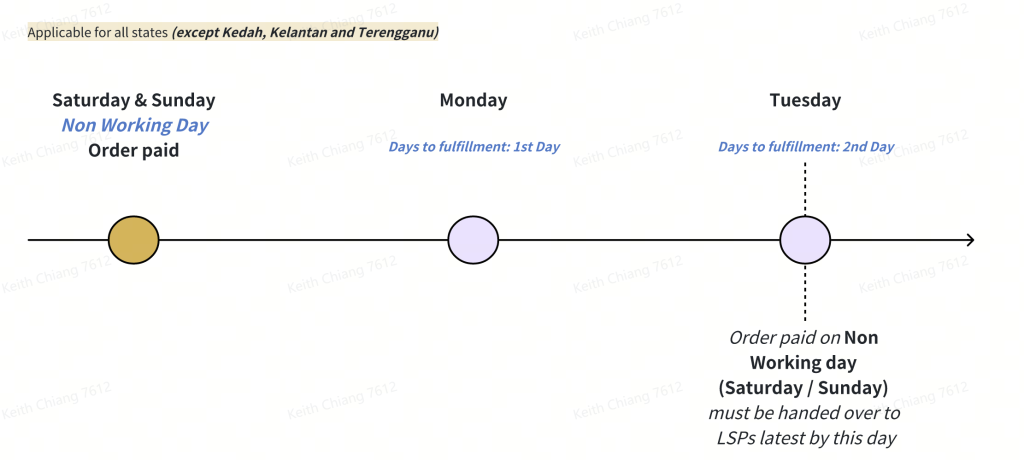
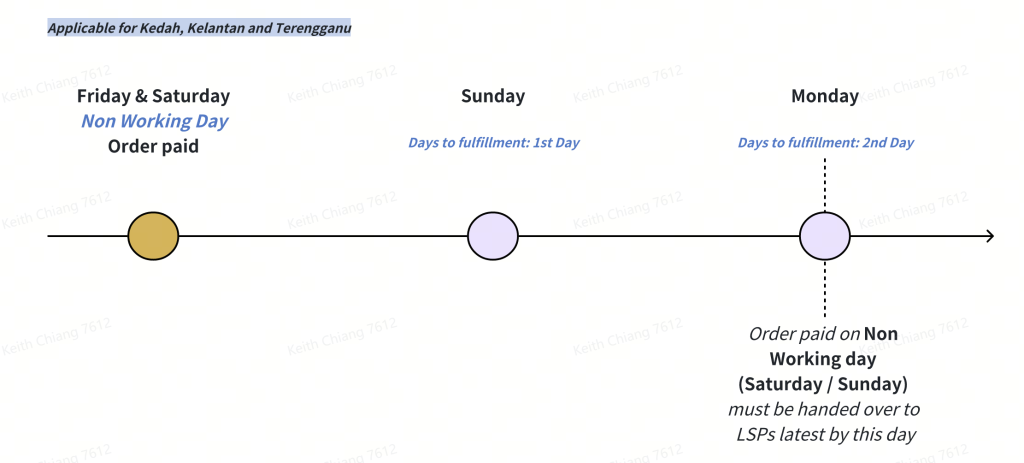
- Regardless of whether a ready stock order(s) is paid on a non-working day (depending on the state) before OR after 2:00 PM, your order must be shipped out within 2 days by 11:59 PM.
3. What Happens If You Ship Your TikTok Shop Orders Late?
If you ship your orders out later than the shipping deadlines, TikTok Shop will activate its auto-cancellation function to cancel the orders. Effective from 2nd September 2024, ‘Ship by TikTok’ orders under these conditions will be automatically cancelled:
| Logistic Type | Order Auto-Cancellation |
| Ship by TikTok | 1. The order is not ready for shipment by 23:59H, 1 working day from when the order was placed (i.e. the order status is not set to “To Ship – Awaiting Collection”). OR 2. The order is ready for shipment but has not been collected by the logistics provider by 23:59H, 3 working days from the date the order was placed. |
This will eventually affect your Late Dispatch Rate (LDR) and Seller-fault Cancellation Rate (SFCR).
i. Late Dispatch Rate (LDR) is the percentage of late shipped orders (orders that take longer than 1 working day to ship out) out of the total number of orders shipped within the last seven (7) calendar days.
ii. Seller-fault Cancellation Rate (SFCR) is the percentage of all orders (over a period of 7 calendar days) that are cancelled by the seller or due to the seller’s fault.
4. Tips to Ship Your TikTok Shop Orders On Time
To ensure a smooth shipping process, here are some helpful tips for you to deliver orders on time:

i. Automate Where Possible: Use order management tools or integrations to automate shipping labels, tracking numbers, and notifications, ensuring a streamlined and efficient process.
ii. Organise Your Inventory: Keep your inventory well-organised and readily accessible. This will help you locate items quickly, thus reducing time spent on picking and packing.
iii. Use Reliable Shipping Partners: Partner with dependable courier services that have a proven track record of on-time deliveries. Monitor their performance regularly.
5. Leverage Your TikTok Shop with SiteGiant
While managing your orders manually can be tedious and time-consuming, you can integrate your TikTok shop into a consolidated system like SiteGiant to automate your daily operations:
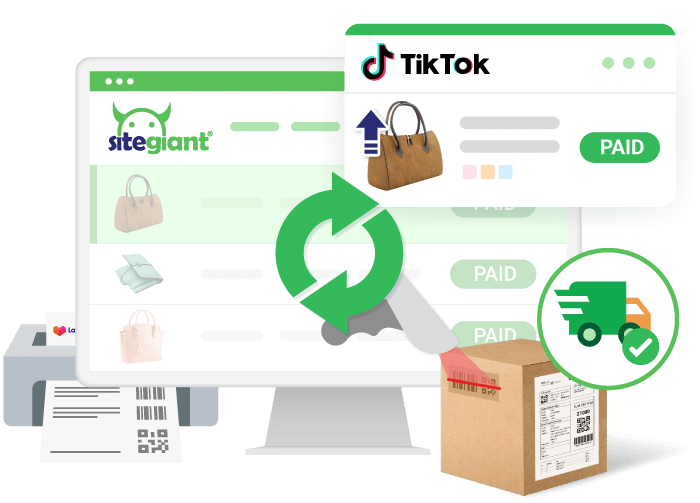
i. Automatically sync multiple TikTok Shops’ orders and update inventory count across all integrated sales channels in SiteGiant to prevent overselling.
ii. Achieve a systematic and faster order fulfilment process, completing orders 50% quicker with greater packing accuracy.
iii. Bulk-print customisable shipping labels, picking and packing lists and invoices all in one go.
Interested to know more? Get a Free Consultation With SiteGiant Today!
Image Credits and References: TikTok Shop Academy and Freepik.