
We’re excited to share the latest system enhancements rolled out in May and June 2025 — all designed to streamline your eCommerce operations and elevate the customer experience. With a focus on smoother workflows and improved usability, these updates are here to drive your business forward. Let’s take a closer look at the latest enhancements.
What’s New in May & June 2025?
- [Order Processing] New ‘MyParcel Asia’ Integration for Webstore and Other Orders
- [Inventory] Create Tasks to Repack Multiple Items Into a Single Product With Semi-Manufacturing
- [Marketing Centre] Empower Your Members to Earn Extra Points with Points Campaign
- [App] Gain Smart Product Insights with the AI Sales & Inventory Intelligence Dashboard
- [App] Display Your Unicart Reviews on Your Webstore to Build Trust and Drive Sales
Feature Enhancement You Shouldn’t Miss
May 2025
- [Fulfillment Center] Package Count and Fulfillment Status Now Displayed on the WMS Fulfillment Dashboard
- [Wave Shipment] Introducing the New ‘Selective SKU Wave’ Wave Type and ‘Group by Courier Service’ Setting
- [Picker Packer Performance Report] Effortlessly Monitor Your Pickers’ and Sorters’ task progress
- [Order Fulfillment Assistant] New ‘Move to Pending Pickup Tab’ and ‘Print AWB’ Setting
- [Order] New ‘Combine’ and ‘Uncombine’ Functions to Simplify Webstore & WooCommerce Order Handling
- [Inventory] New ‘Export Stock Movement’ Feature Now Available
- [Product Listing] New ‘Product Compliance’ Fields Added to TikTok listing
- [Marketplace Pricing Management] Easily Set Product Price and Discount in Bulk
- [Purchase Order] Choose Your Preferred Currency When Creating PO
- [Shipping Profile] Let Customers Checkout Separately by Shipping Profile
- [Membership Voucher] New ‘Yearly Recurring’ Vouchers to Keep Your Members Engaged
- [Shopping App] Referral Program Now Supported
- [Shopping App] A Series of Enhancements to Streamline Your Workflow Related to the Malaysia Ey-Invoice
- [SiteGiant POS] GTO Report Now Supports More Malls and API connection
- [SQL Sync] New Option Lets You Exclude TikTok Sample Orders from Processing
- [Xero Sync] Choose Which Customer Information to Sync by Channel
June 2025
- [Order Processing] Easily Manage and Prioritize Your TikTok Next Day Delivery Orders
- [Purchase Order] Printing barcodes for UOM iSKU is Now Supported
- [Barcode Label] Bulk Printing for Barcode Labels is Now Supported
- [My Account] Easily Manage and Renew Your SiteGiant Account
- [SiteGiant POS] ‘Cancelled Sales’ Details Added to POS Shift Report
- [SiteGiant POS] Add Cancellation Reason When Cancelling a Transaction
- [Smart Salesman App] Enhanced Features for a Smoother Workflow
What’s New in March 2025?
1. [Order Processing] New ‘MyParcel Asia’ Integration for Webstore and Other Orders

We’re excited to introduce our new integration with MyParcel Asia, now supporting both Webstore and Other Orders. No more switching between platforms — process and print MyParcel Asia shipping labels directly within SiteGiant. This enhancement simplifies your workflow and improves daily operational efficiency.
2. [Inventory] Create Tasks to Repack Multiple Items Into a Single Product With Semi-Manufacturing

Semi-Manufacturing is a powerful new feature that lets you create tasks for repacking one or more source items into a new, sellable product – helping you boost sales and streamline inventory handling.
Example Use Case:
Let’s say you’re selling a Gift Hamper that includes a basket, biscuits, and a bottle of red wine, each sourced from different suppliers. With Semi Manufacturing, you can pick these individual items and repack them into a single, sellable Gift Hamper.
How It Works:
i. Once source items are Picked and Saved, stock is immediately deducted from both Stock On Hand and Sellable Stock.
ii. To revert picked quantity, enter a negative value (e.g. -1) in normal mode or Rack/Batch mode.
iii. Only the Repacked Quantity can be Stocked In as the new product.
3. [Marketing Centre] Empower Your Members to Earn Extra Points with Points Campaign
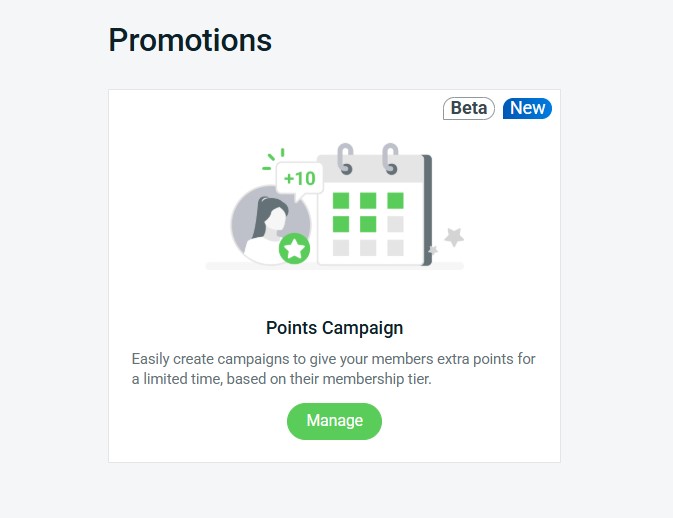
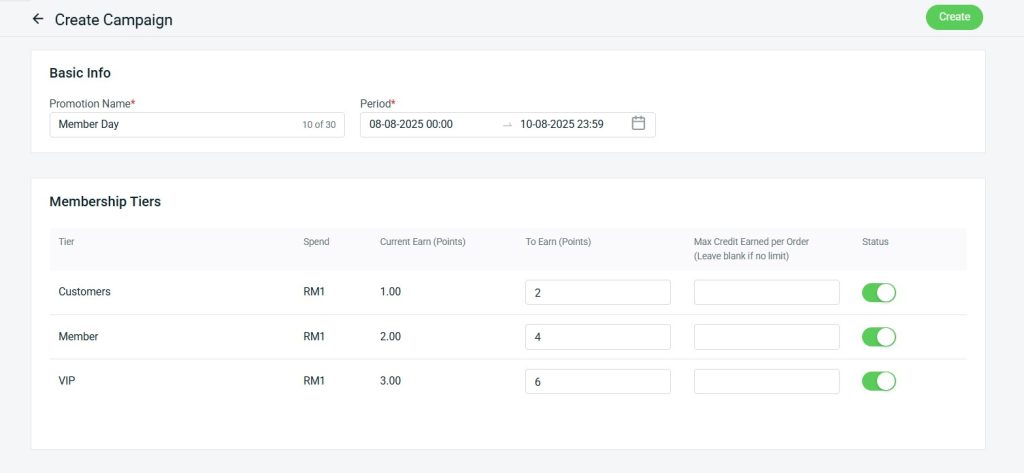
Make your special events even more rewarding! With the new Points Campaign feature, you can launch time-limited campaigns that allow customers to earn extra points during key occasions like member sales, VIP days, and other exclusive events. It’s a powerful way to boost engagement, drive repeat purchases, and make your loyal members feel truly valued.
4. [App] Gain Smart Product Insights with the AI Sales & Inventory Intelligence Dashboard
We’re thrilled to introduce our latest add-on app — AI Sales & Inventory Intelligence Dashboard! This powerful tool provides AI-driven insights based on real sales behavior, helping you identify your most potential, best-selling, underperforming products. Leverage these insights to make smarter, data-backed decisions and confidently optimize your sales strategy for better results!
Key Insights Include:
- Most Potential iSKU
- Top Grow iSKU
- Top Drop iSKU
- Top 10 Best Selling iSKU by Revenue
- Top 10 Best Selling iSKU by Unit Sold
- GMV Performance Breakdown
- Most Return/Refund iSKU
5. [App] Display Your Unicart Reviews on Your Webstore to Build Trust and Drive Sales

Great news for Unicart users!
You can now import your customer reviews from Unicart and showcase them directly on your webstore — giving potential customers more confidence to buy and helping you improve conversion rates.
📌 Note: Please contact our support team to import your Unicart reviews into the ERP system.
Feature Enhancement You Shouldn’t Miss
May 2025
1. [Fulfillment Center] Package Count and Fulfillment Status Now Displayed on the WMS Fulfillment Dashboard
You can now view the number of packages and their current fulfillment statuses directly from the WMS Fulfillment Dashboard — making it easier to monitor progress at a glance.
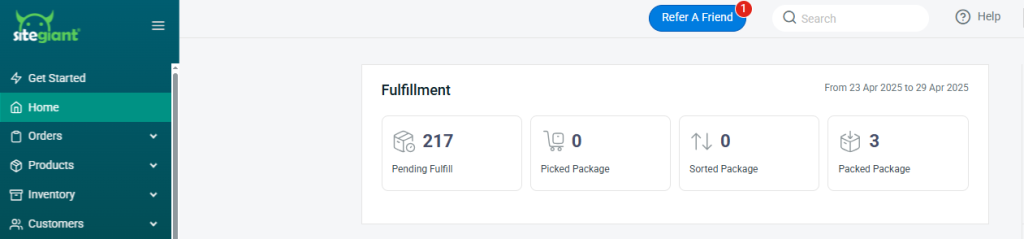
i. Pending Fulfill: Packages which have not been picked/sorted/packed (including Pending Process / Processed status, created Pick List, Printed)
ii. Picked Package: Packages which have been picked from Mode 1/3
iii. Sorted Package: Packages which have been sorted from Mode 1/2/3
iv. Packed Package: Packages which have been processed from ScanNPrint, Order Fulfillment Assistant or Carrier Manifest
2. [Wave Shipment] Introducing the New ‘Selective SKU Wave’ Type and ‘Group by Courier Service’ Setting
We’ve rolled out two powerful updates to enhance your wave shipment management — giving you greater control and boosting your picking efficiency.
i. New “Selective SKU Wave” Type
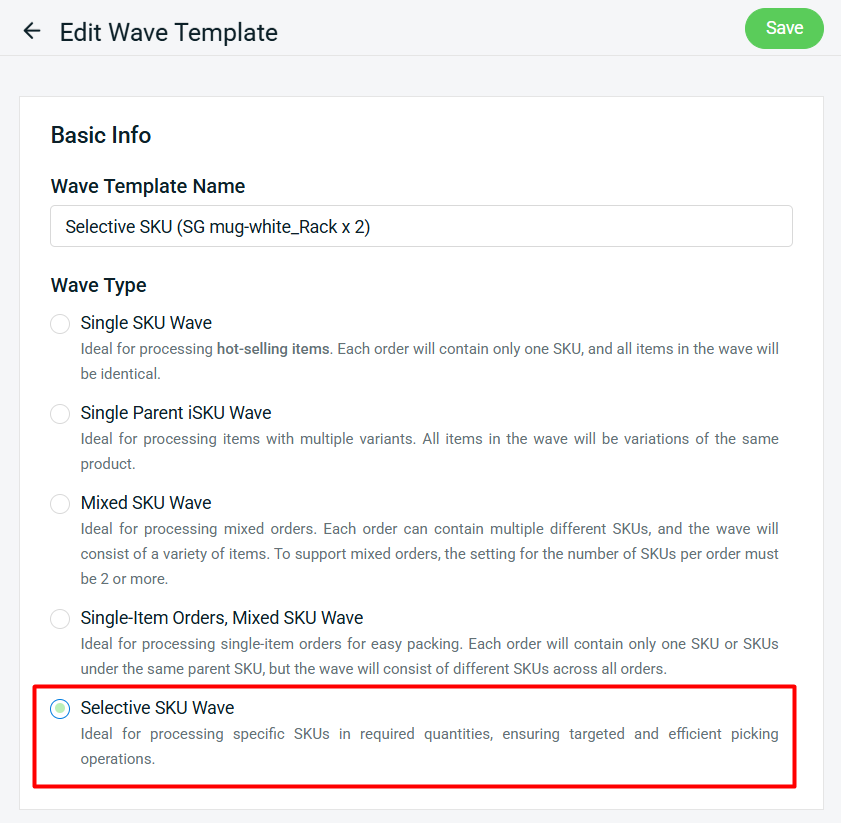
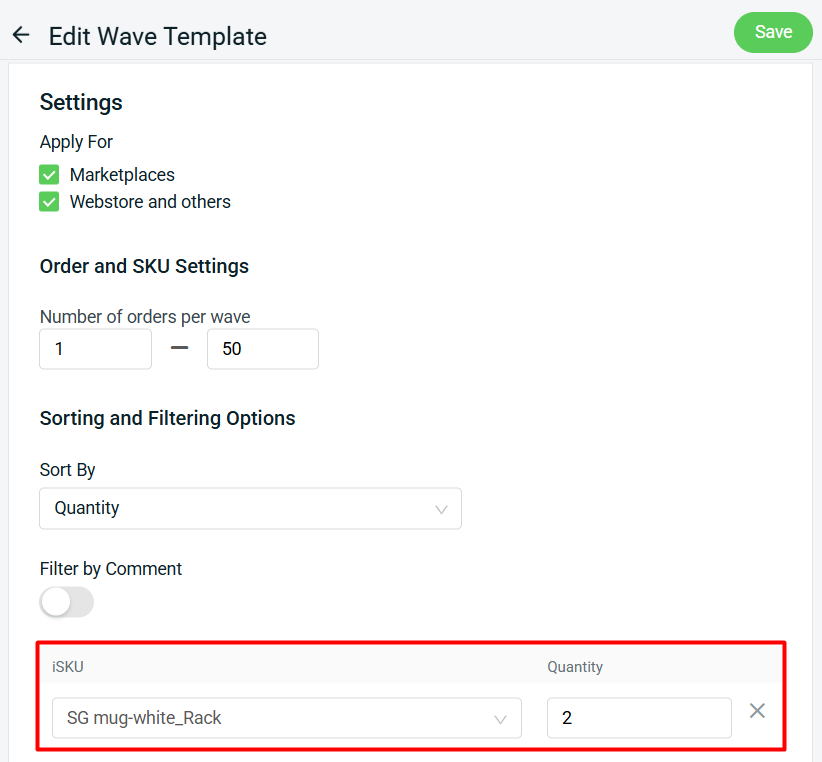
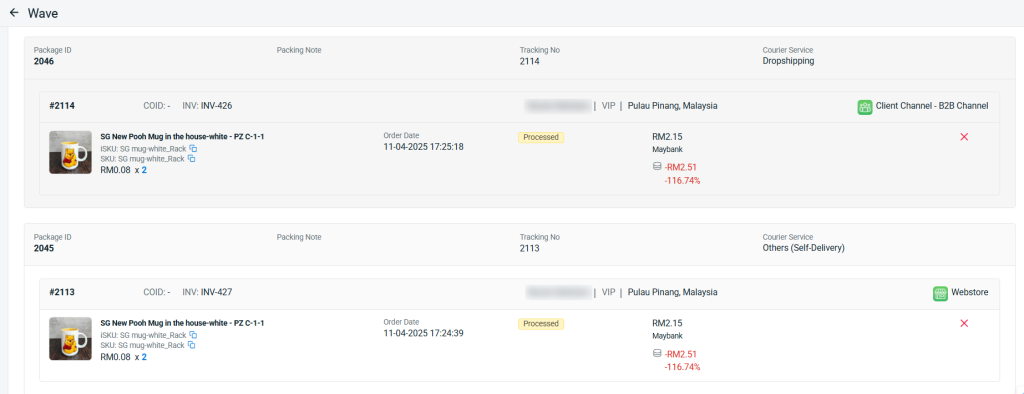
The new “Selective SKU Wave” is designed to improve picking efficiency, especially during campaigns and promotions. It allows you to generate and filter waves based on selected SKUs and required quantities.
*Note:
(i) To add a kit — add its individual items.
(ii) To add a Unit of Measure item (e.g., a box) — add base iSKU and quantity.
ii. New “Group by Courier Service” Setting
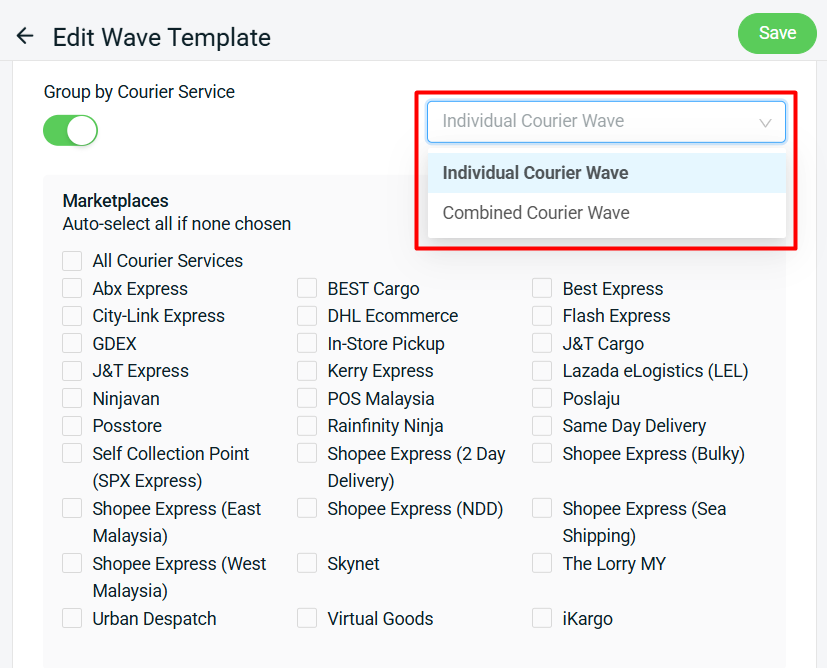
Now you can choose to generate either “Individual Courier Wave” or “Combined Courier Wave” by enabling the “Group by Courier Service” option.
- Individual Courier Wave: One wave will be created per courier.
- Combined Courier Wave: One wave includes multiple couriers.
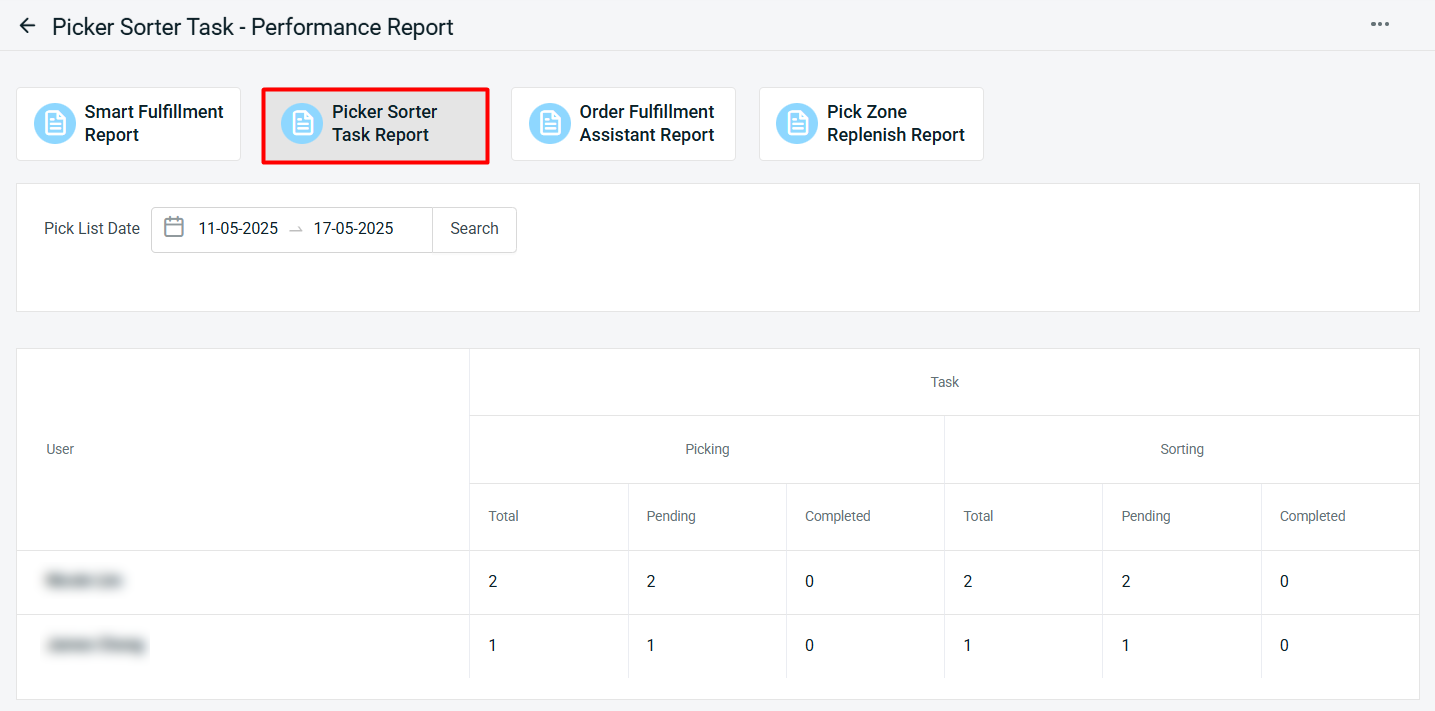
3. [Picker Packer Performance Report] Effectively Monitor Your Pickers’ and Sorters’ Task Progress
We’ve launched the new “Picker Sorter Task Report” to help you easily monitor the task progress of your pickers and sorters based on the selected Pick List Date. This report helps you gain better visibility into daily operations and improve overall warehouse efficiency.
4. [Order Fulfillment Assistant] New ‘Move to Pending Pickup Tab’ and ‘Print AWB’ Setting
We’ve added two new settings to improve your order fulfillment process — giving you greater control and efficiency.
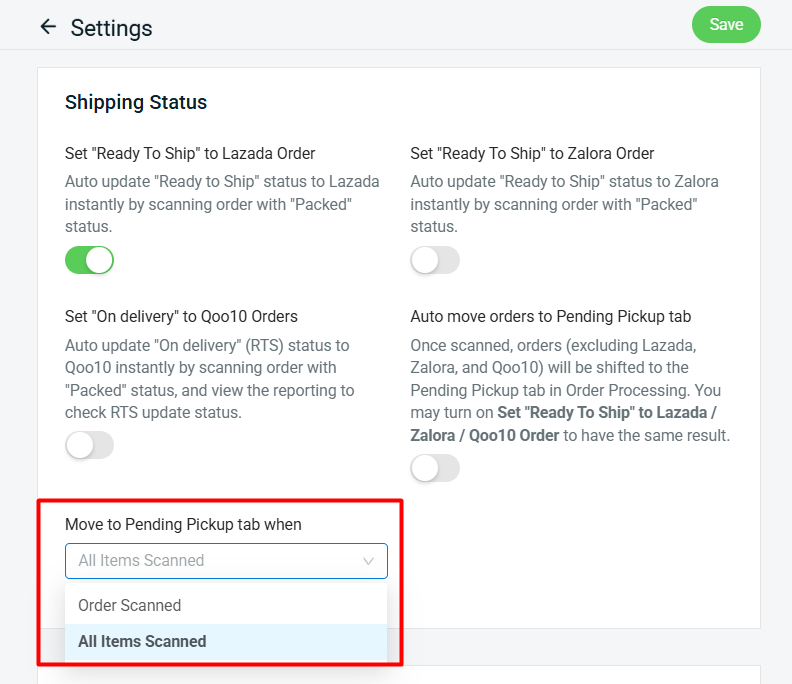
i. New “Move to Pending Pickup tab” Setting
This setting is applicable when the “Scan Item” and any of the “Shipping Status” settings are enabled. It allows orders to automatically move to the Pending Pickup tab in Order Processing – but only after the order or all items have been scanned.
(Supported on Web version only, not available on SiteGiant ONE)
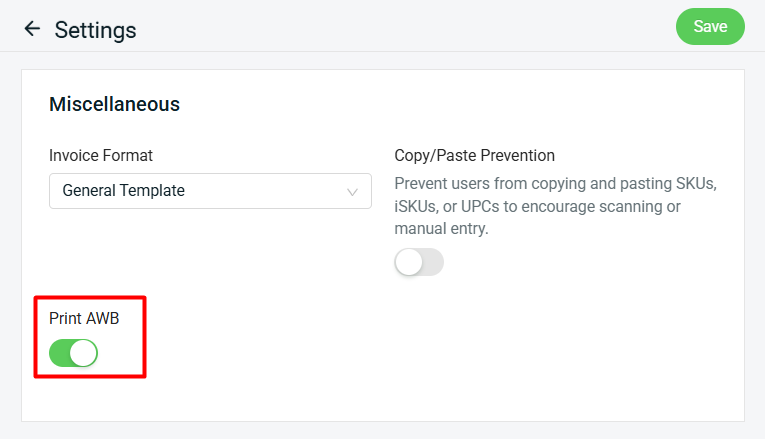
ii. New “Print” AWB Setting
With this setting enabled, you can instantly print shipping labels (AWB) after fulfilling your orders, streamlining your shipping process.
5. [Order] New ‘Combine’ and ‘Uncombine’ Functions to Streamline Webstore & WooCommerce Order Handling
We’ve added “Combine” and “Uncombine” functions to the Webstore & WooCommerce Order Details Page, making your order fulfillment more efficient and easier to manage.
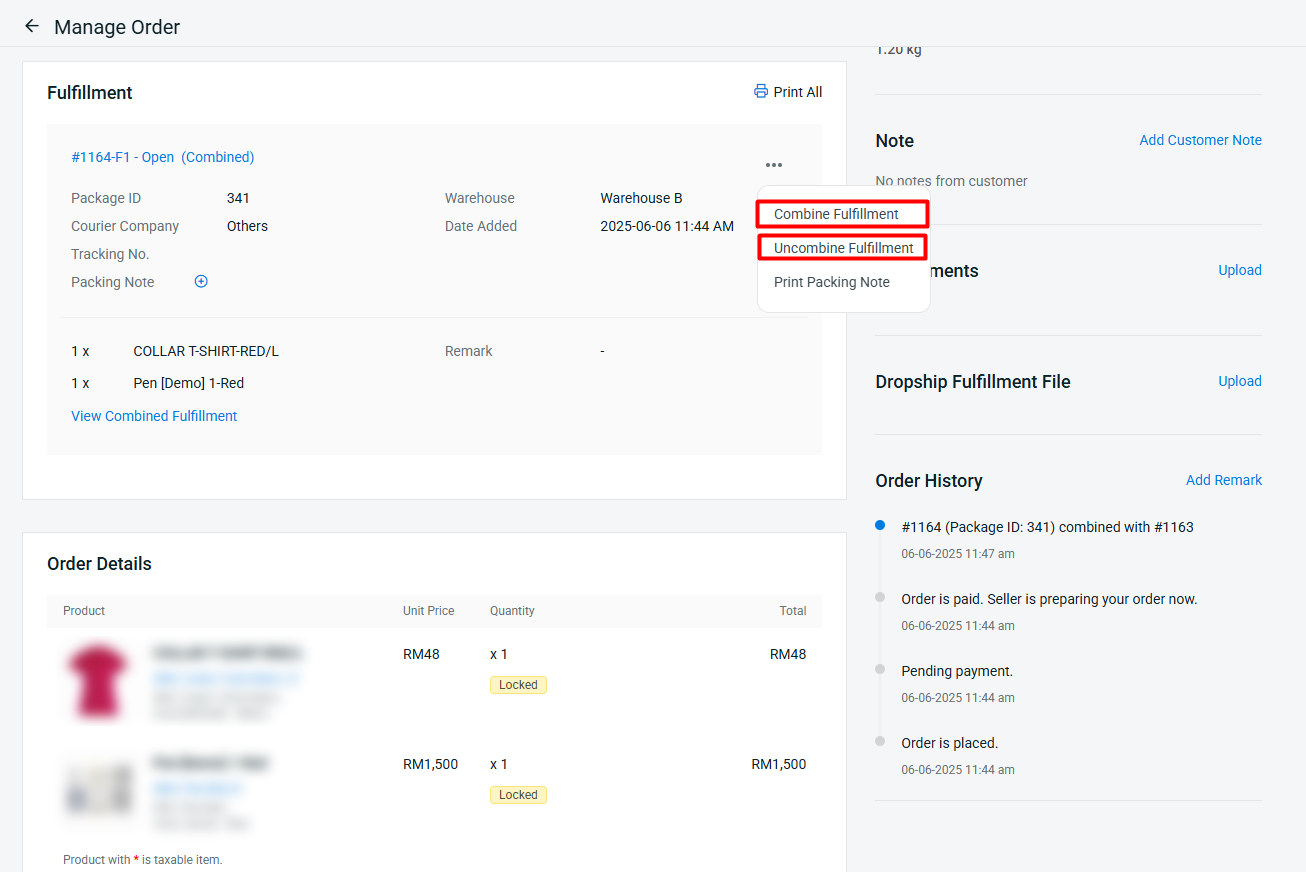
Requirements for Combine / Uncombine:
- Orders must belong to the same ERP customer
- Orders must have the same shipping address
- Orders must not be pickup orders
- Order packages must have a fulfillment status of “Open”, and must not contain tracking number
- Order status must not be “Open”, “Cancelled”, or “Completed” status
- Only available for WooCommerce orders that have been retrieved into ERP customer account
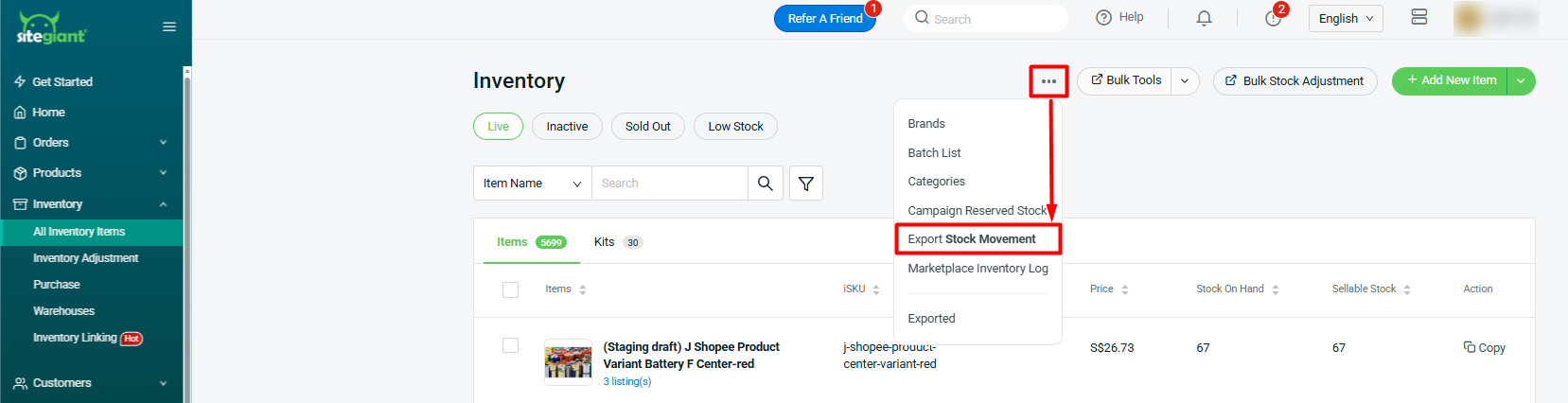
6. [Inventory] New ‘Export Stock Movement’ Feature Now Available
Keep track of your inventory with ease — you can now export stock movement to Excel for better tracking and backup.
7. [Product Listing] New ‘Product Compliance’ Fields Added to TikTok listing
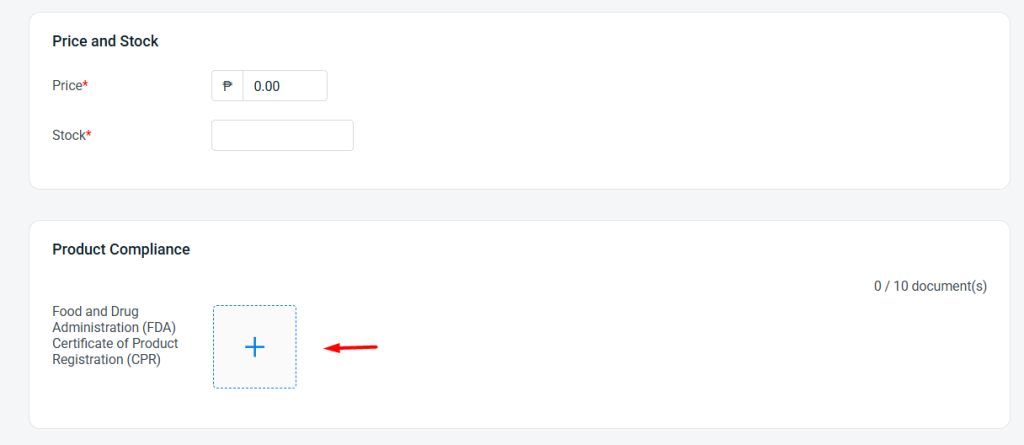
We’ve added support for “Product Compliance” fields in TikTok listing, helping you stay aligned with platform requirements more easily.
Remark:
i. Only applicable for certain categories of certain TikTok regions
ii. Supported file formats: JPG, JPEG, PNG and PDF only
8. [Marketplace Pricing Management] Easily Set Product Price and Discount in Bulk
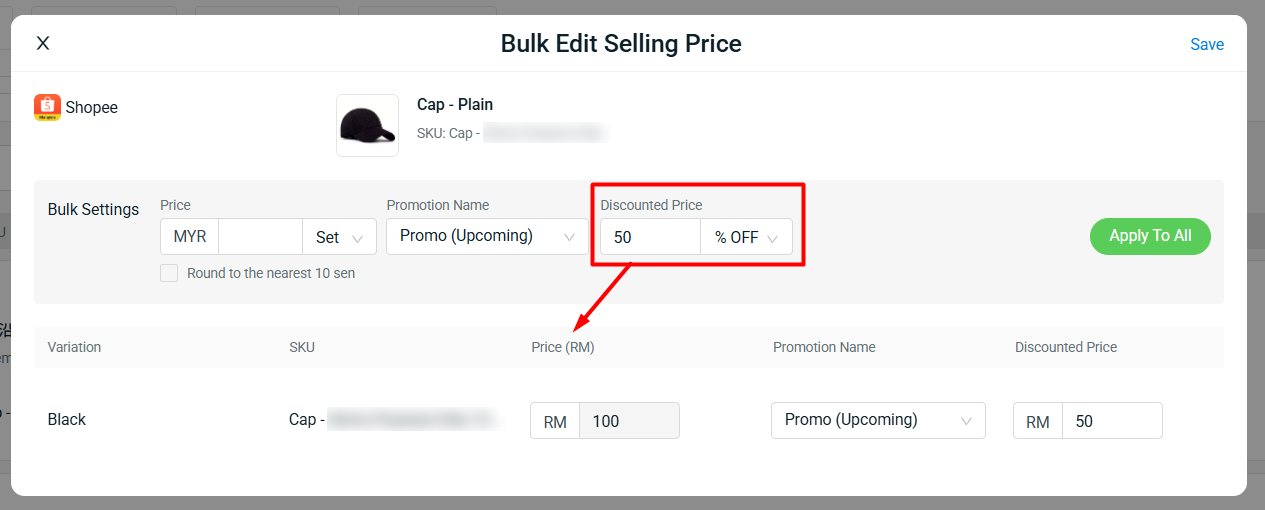
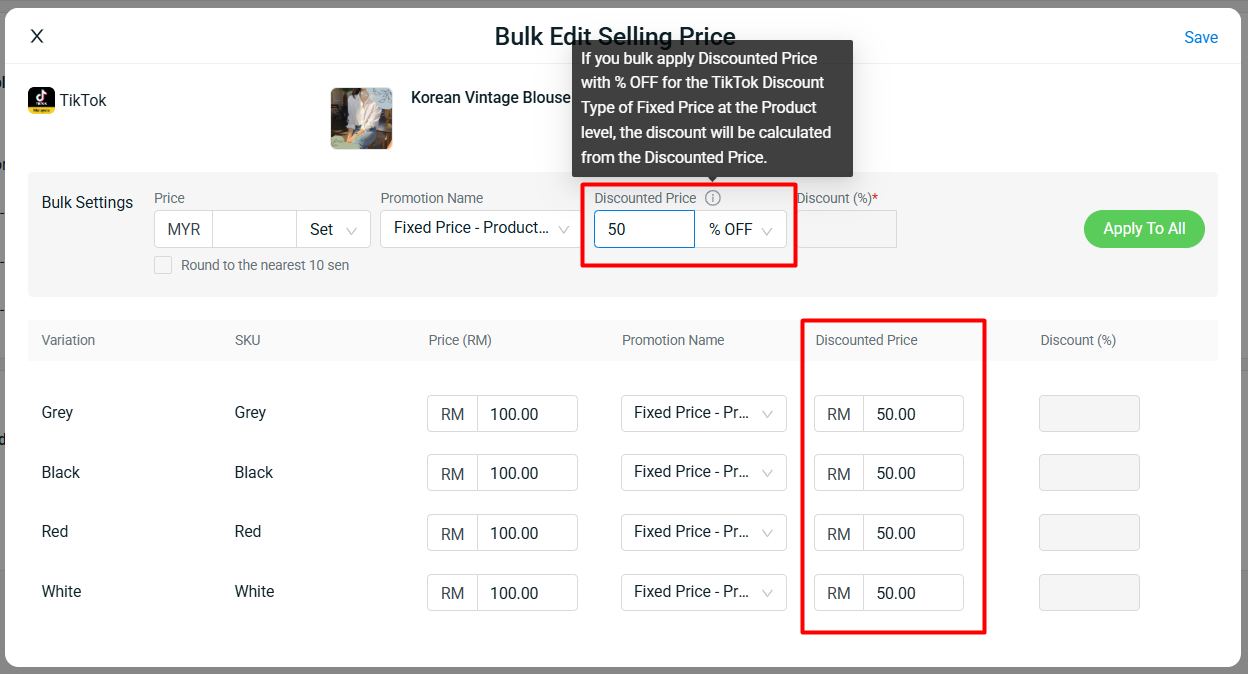
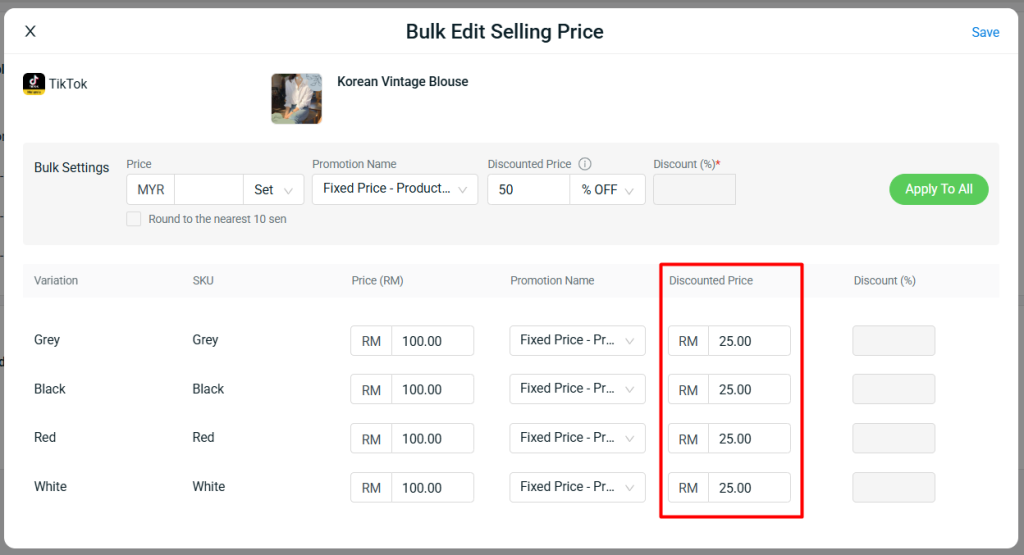
We’ve introduced new “% UP” and “% OFF” settings, making it easier to apply bulk pricing adjustments quickly and efficiently.
i. For the Discounted Price, when you set “% OFF“, it will be calculated based on the Original Price.
ii. For TikTok, if you apply “% OFF” for Fixed Price Discount at the Product Level, it will be calculated based on the Discounted Price.
9. [Purchase Order] Choose Your Preferred Currency When Creating a PO
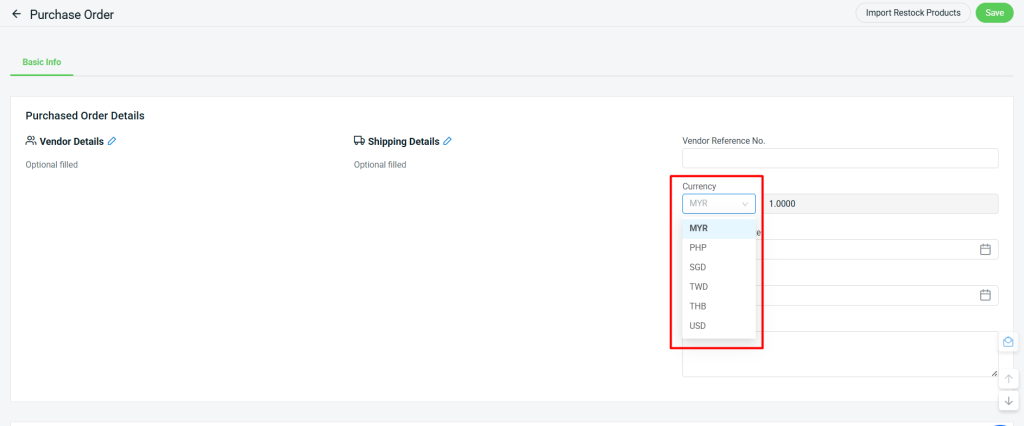
You can now select your preferred currency when creating a Purchase Order (PO), giving you greater flexibility in managing international suppliers.
Staff Account Permission Requirement:
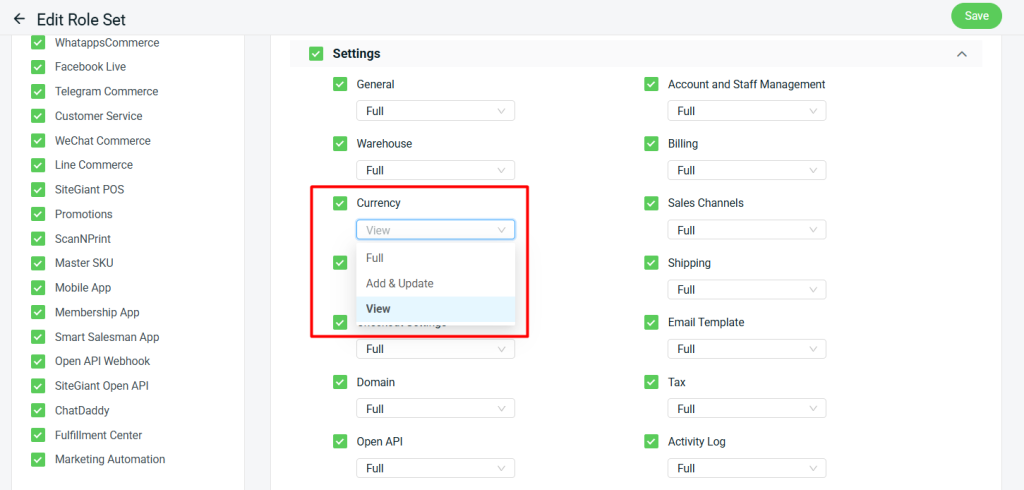
To change the currency in a Purchase Order, the staff account must have at least “View” permission for the “Currency” setting. Even if the account has full permission for Purchase Order, the currency field will remain non-editable without this permission.
10. [Shipping Profile] Let Customers Check Out Separately by Shipping Profile
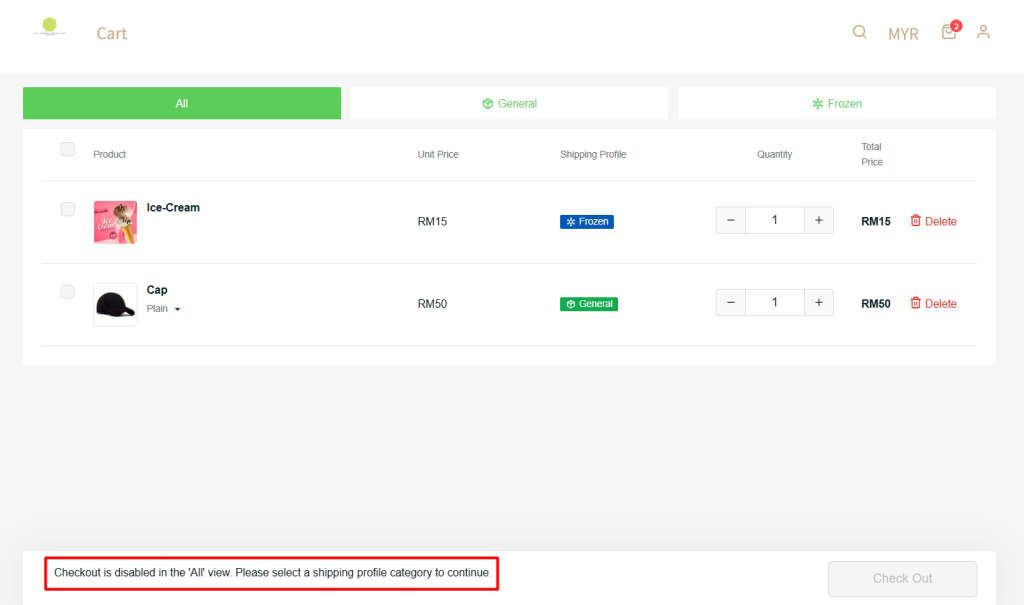
Great news! A new “Split Checkout by Shipping Profile” setting is now available under Shipping Profile, allowing customers to check out separately based on their assigned shipping profiles.
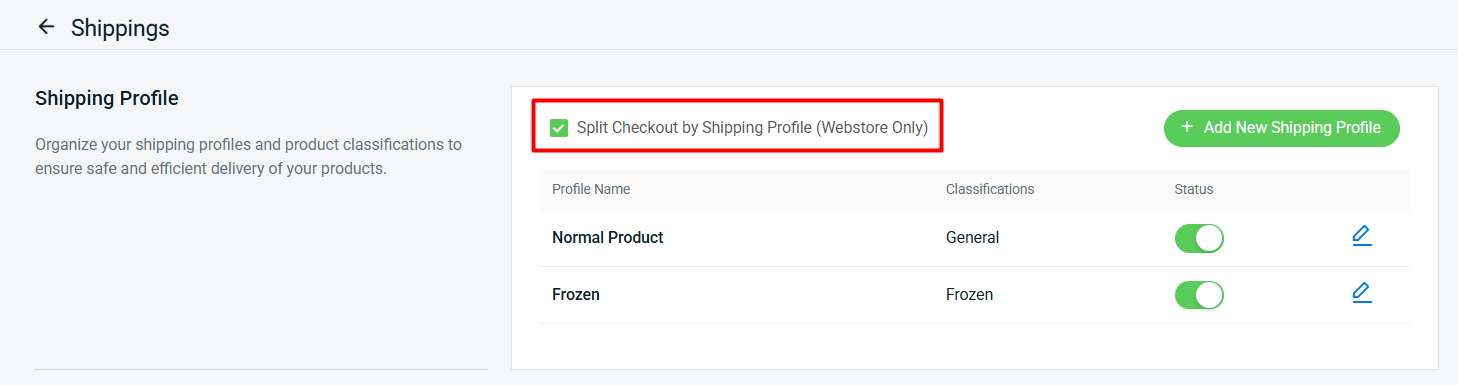
i. Once enabled, customers will not be able to complete a single checkout if their cart contains items from different shipping profiles. The “Check Out” button will be disabled under the “All” category.
ii. Customers must check out separately based on the assigned shipping profile.
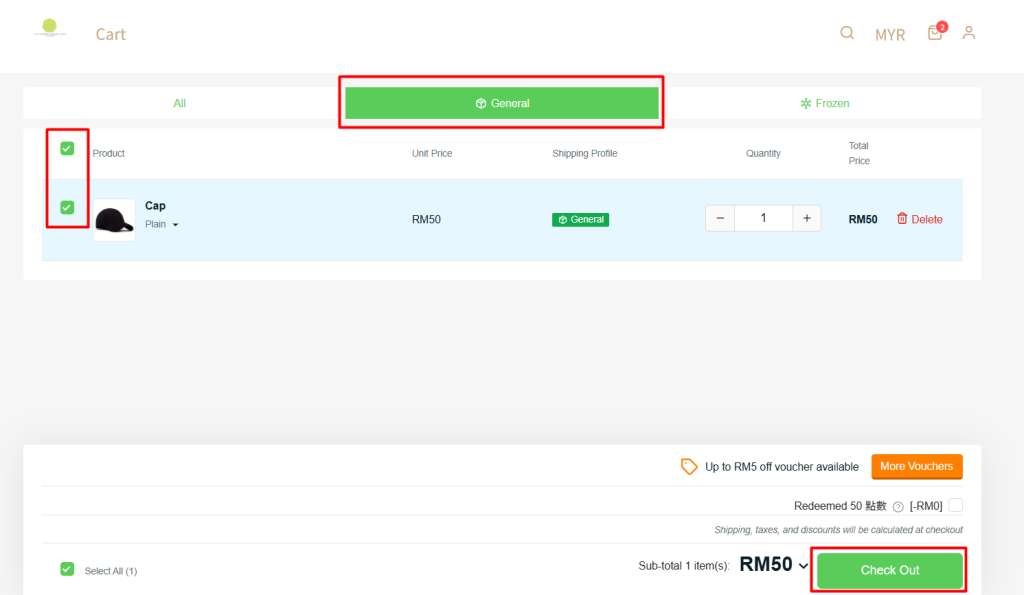
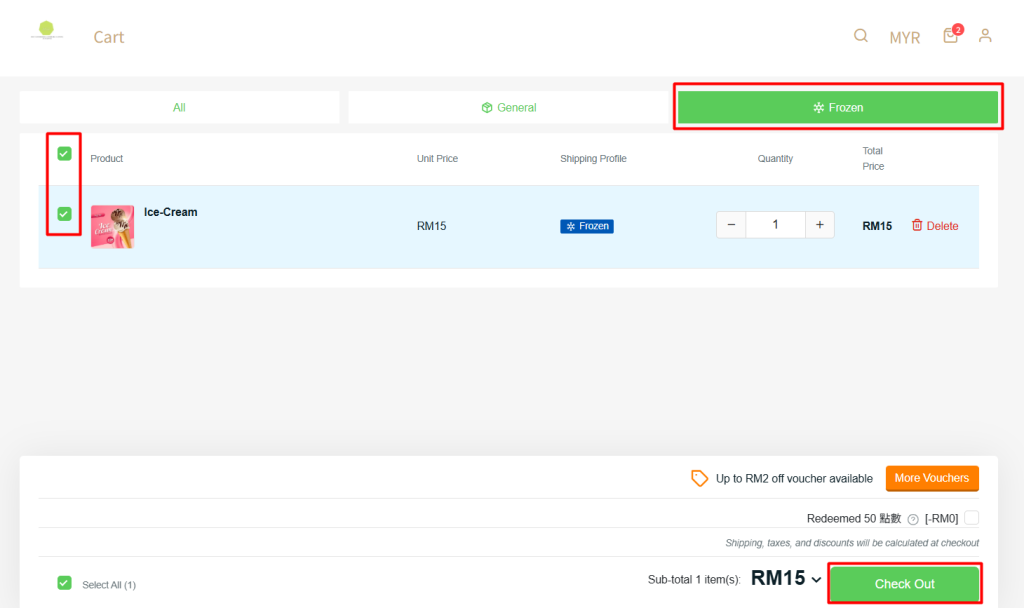
Remark: This feature currently applies to Webstore checkout only.
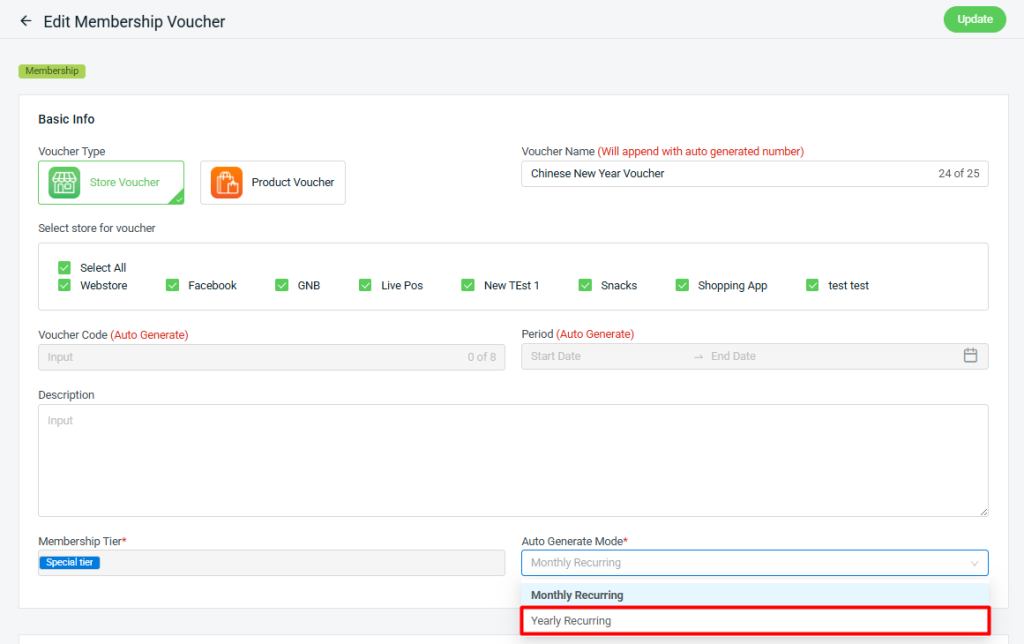
11. [Membership Voucher] New ‘Yearly Recurring’ Vouchers to Keep Your Members Engaged
We’ve introduced a new Yearly Recurring auto-generate mode under Membership Tier Vouchers, enabling vouchers to automatically regenerate every year — helping you maintain member engagement and reward loyalty effortlessly.
12. [Shopping App] Referral Program Now Supported
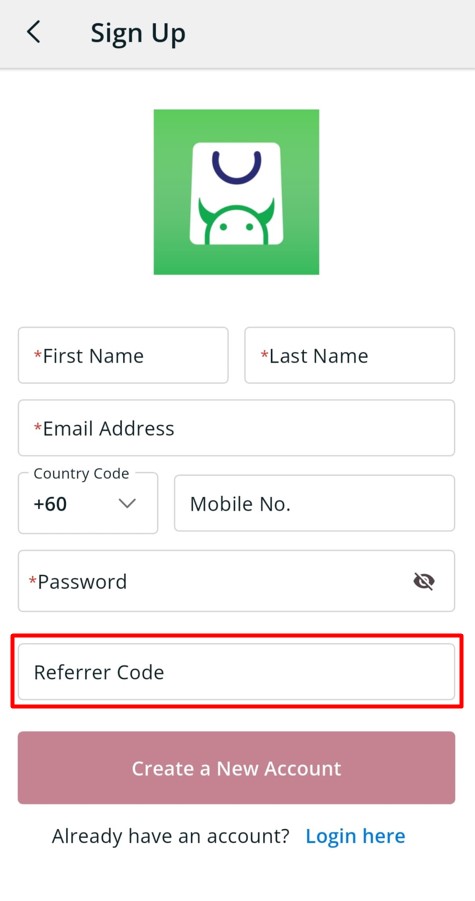
We’re excited to announce that the Referral Program is now supported in the Shopping App. A Referral Code field has been added to the Sign-Up page, allowing new users to enter a referral code during registration.
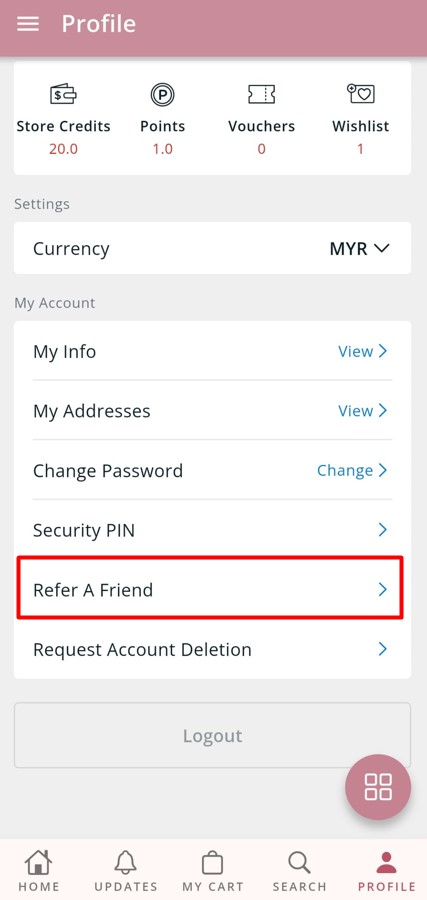
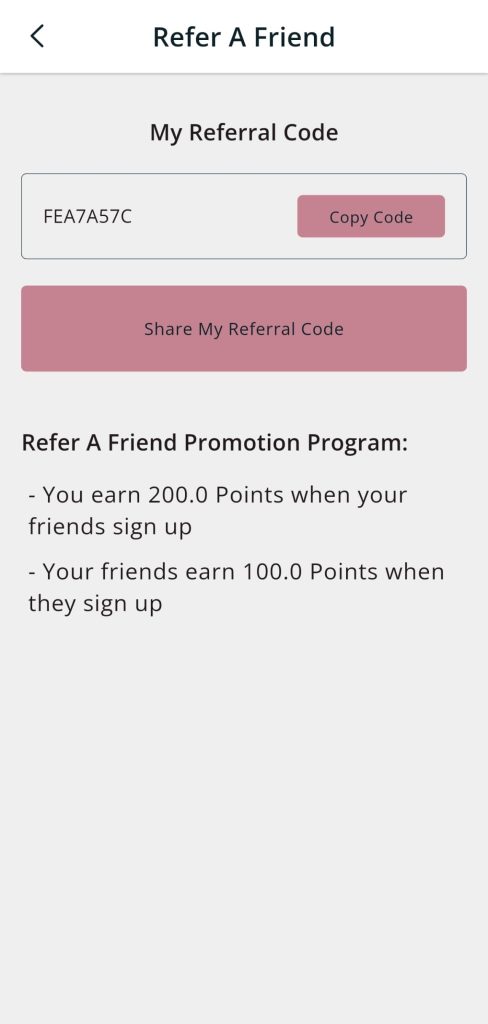
Additionally, members can now retrieve their own referral code directly from the Shopping App and share it with friends to earn rewards.
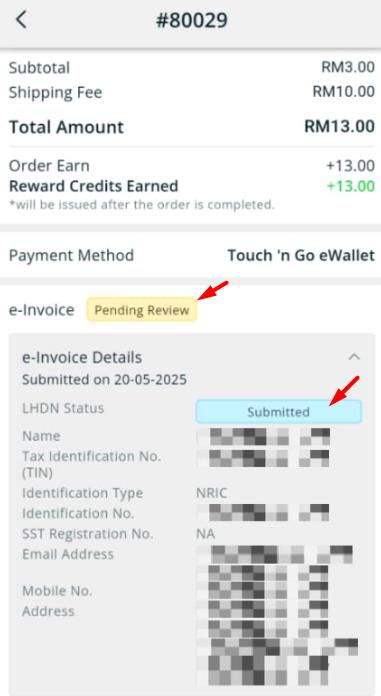
13. [Shopping App] A Series of Enhancements to Streamline Your Workflow Related to the Malaysian E-Invoice
We’ve introduced several enhancements to the Shopping App to help streamline the Malaysia E-Invoice Workflow.
i. e-Invoice Details Form
a. Added “Save Draft”, “Submit” & “Copy Billing / Shipping Address” functions to the e-Invoice Details form.
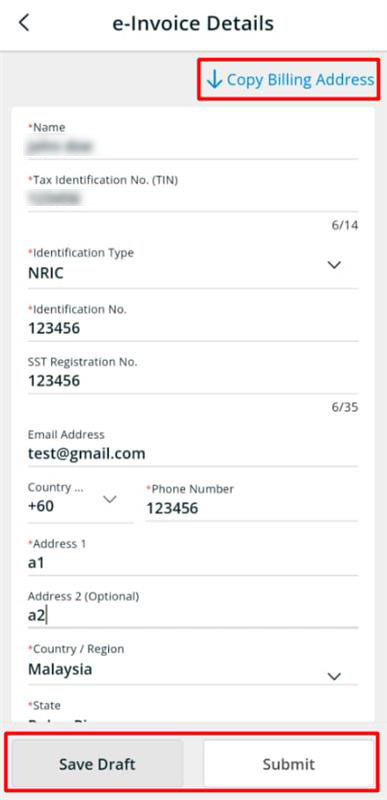
b. The country selection field now displays only the countries supported by your webstore.
ii. Shopping App Order Details Page
a. “e-Invoice Information” and “LHDN Status Tag” have been newly added to the Shopping App order details page for better visibility and tracking.
14. [SiteGiant POS] GTO Report Now Supports More Malls and API Connection
We’ve added new GTO report types to support additional shopping malls, including Sunway Pyramid, Sutera Mall, Gurney Plaza, Queensbay Mall and 1 Utama.
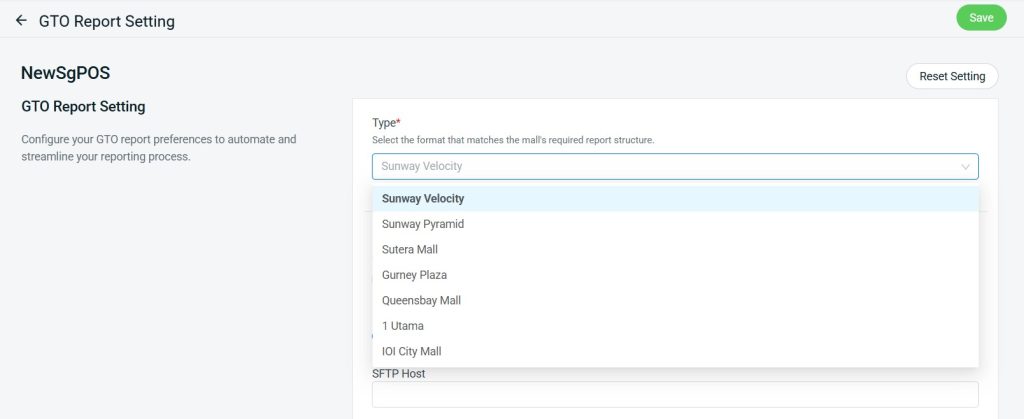
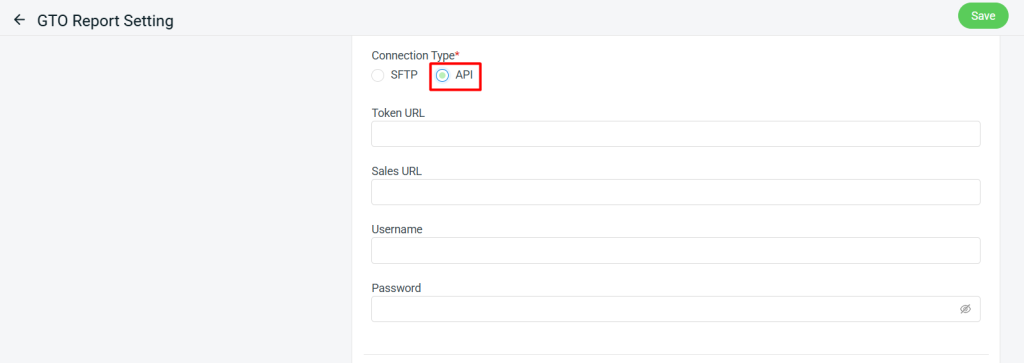
In Addition, a new “API” Connection type setting is now available. The supported connection types for each report type are as follows:
- Sunway Velocity (SFTP, API)
- Sunway Pyramid (API)
- Sutera Mall (API)
- Gurney Plaza (SFTP)
- Queensbay Mall (SFTP)
- 1 Utama (API)
- IOI City Mall (API)
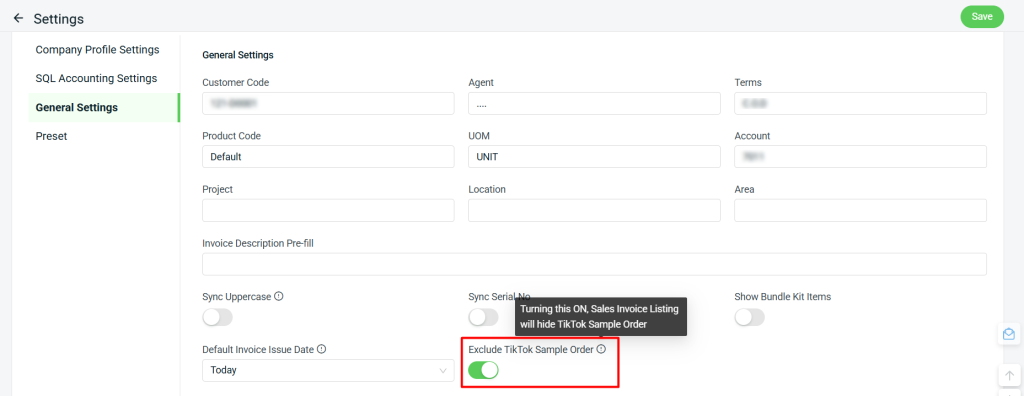
15. [SQL Sync] New Option to Exclude TikTok Sample Orders from Processing
A new “Exclude TikTok Sample Order” option has been added to the SQL Sync settings. When enabled, TikTok Sample Orders will be hidden from the Sales Invoice Listing.
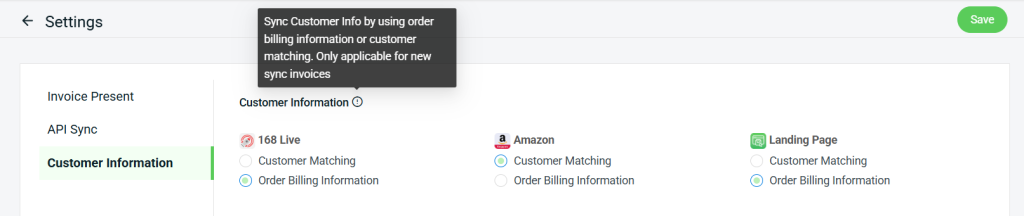
16. [Xero Sync] Choose Which Customer Information to Sync by Channel
You can now control which type of customer information to sync to Xero Invoices for each channel, giving you greater control over your accounting data.
June 2025
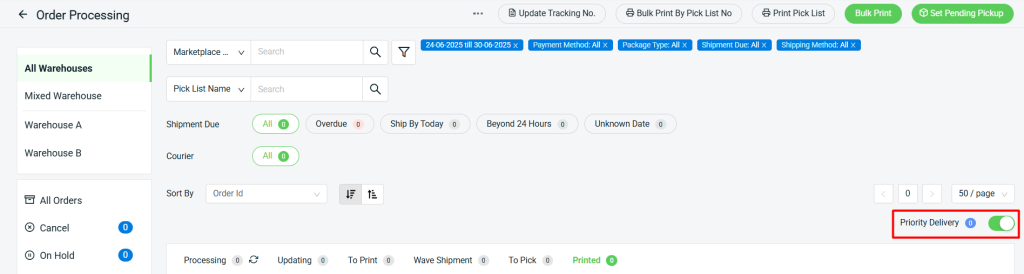
1. [Order Processing] Easily Manage and Prioritize Your TikTok Next Day Delivery Orders
You can now filter TikTok NDD (Next Day Delivery) orders by “Priority Delivery”, helping you streamline your workflow and ensure timely fulfillment.
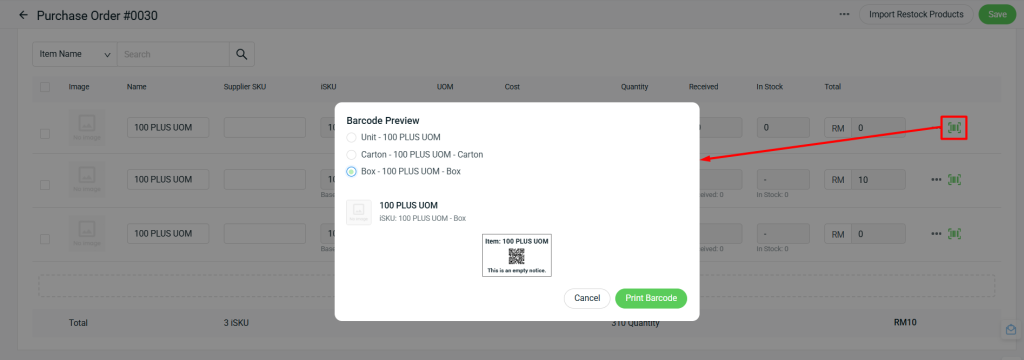
2. [Purchase Order] Barcode Printing for UOM iSKU Now Supported
You can now print barcodes for UOM iSKU directly from the Purchase Order page — making inventory management and labeling more efficient.
3. [Barcode Label] Bulk Printing for Barcode Labels Now Supported
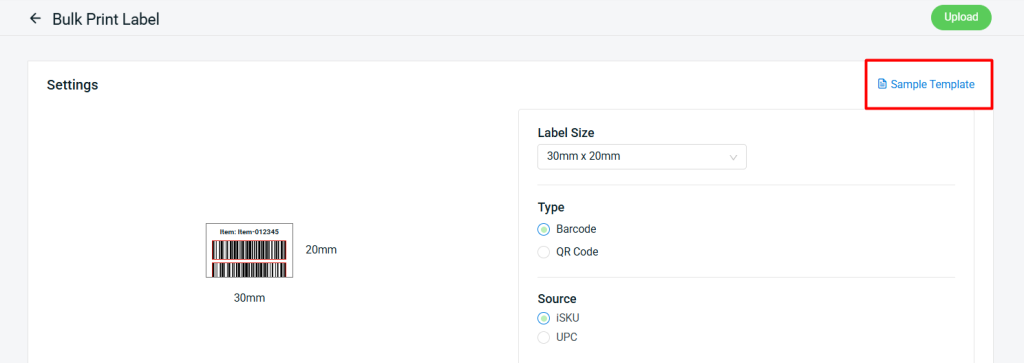
Bulk barcode label printing is now supported to simplify your workflow and boost efficiency.
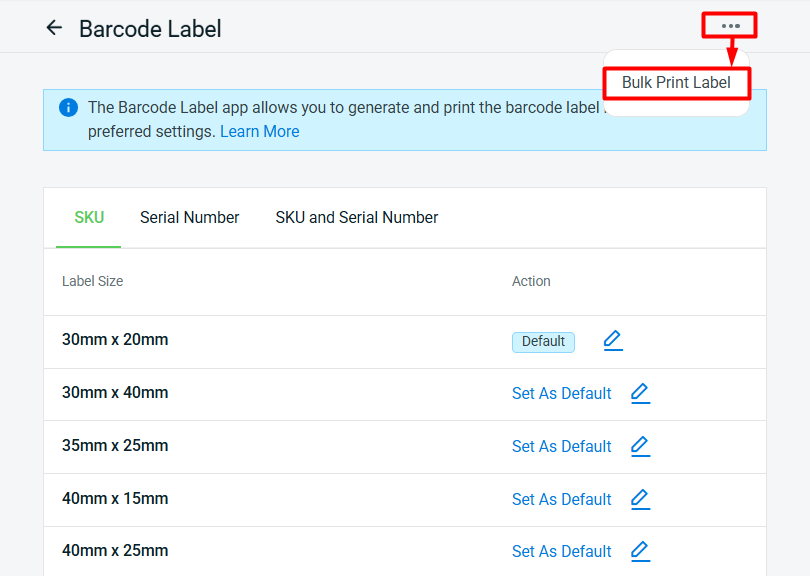
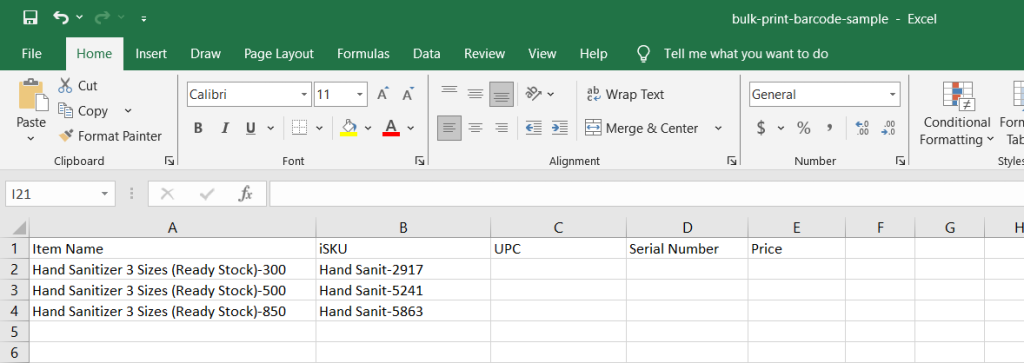
i. Click “Sample Template” to download the Excel template and fill in the details.
Note: If your ERP plan is not entitled the Serial Number feature, leave the Serial Number column blank. Do not remove column, as doing so will result in an error during the upload process.
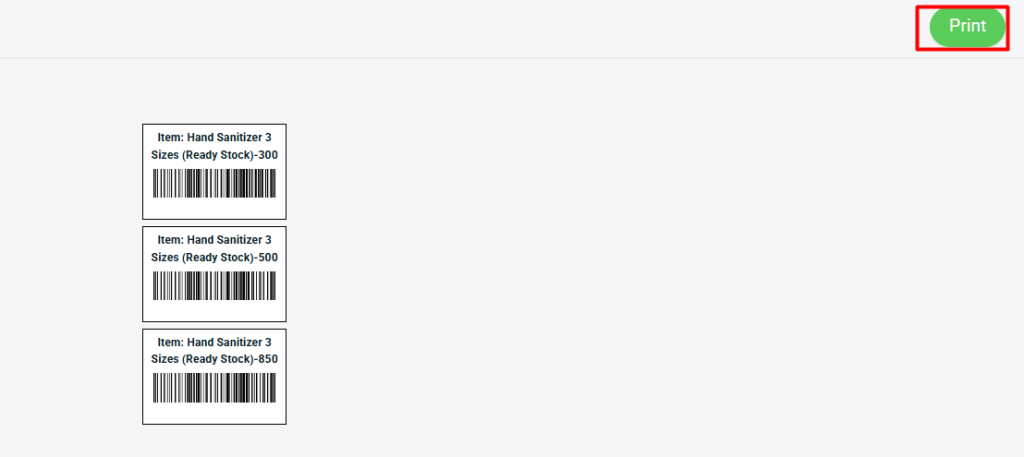
ii. After completing the Excel file, click “Upload” and then “Print” to proceed with bulk barcode label printing.
4. [My Account] Easily Manage and Renew Your SiteGiant Account
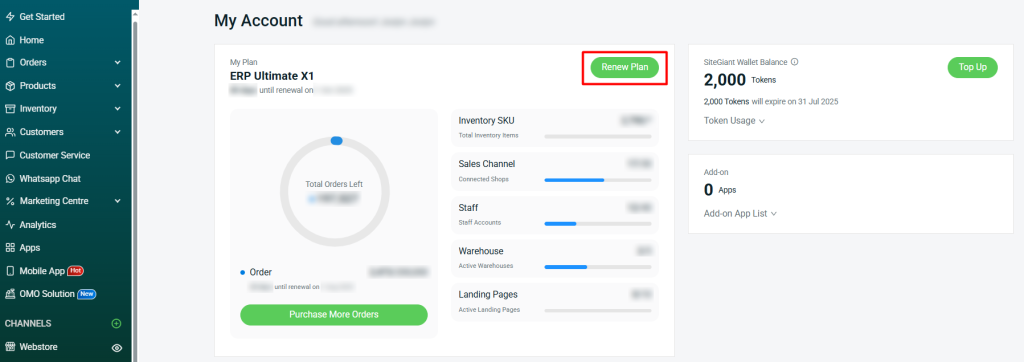
You can now renew your existing SiteGiant plan (without any upgrades or downgrades) directly from the My Account (SiteGiant Wallet) page, making account management faster and more convenient.
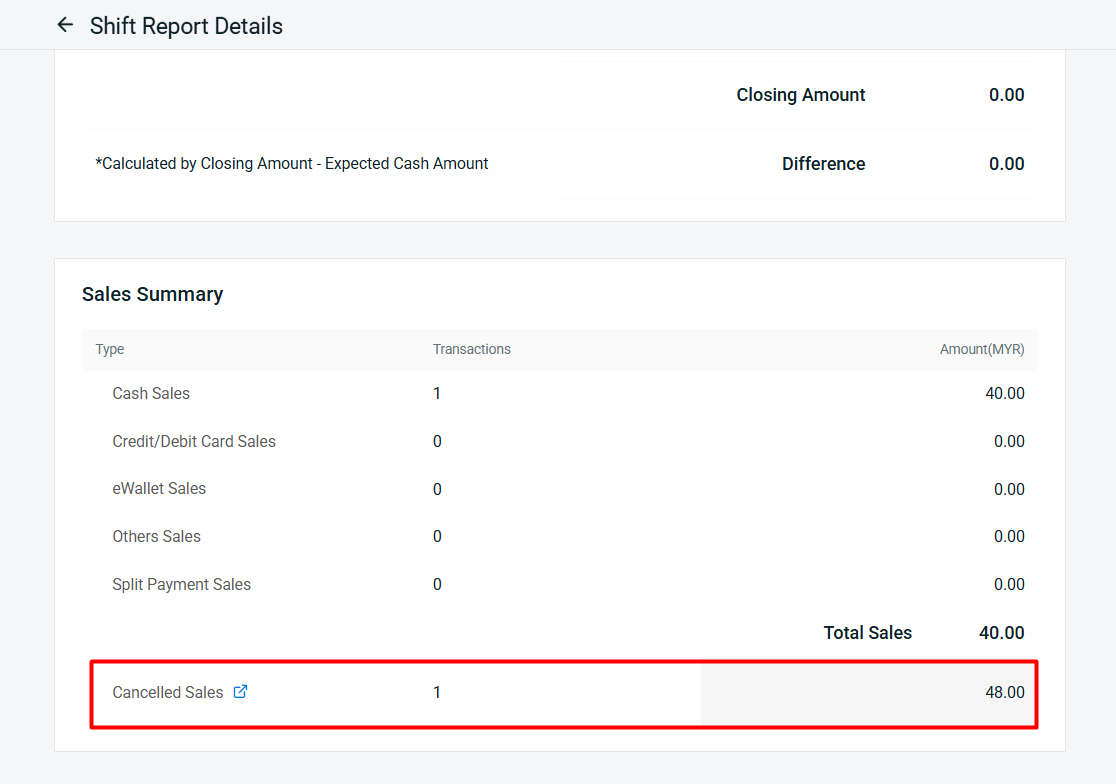
5. [SiteGiant POS] ‘Cancelled Sales’ details added to POS Shift Report
“Cancelled Sales” details are now included in the POS Shift Report, giving you full visibility into every transaction for more accurate sales tracking.
6. [SiteGiant POS] Add Cancellation Reason When Cancelling a Transaction
SiteGiant POS App now displays a pop-up box prompting users to enter a cancellation reason when cancelling a transaction. This helps merchants better trace and understand the reasons behind cancelled transactions.
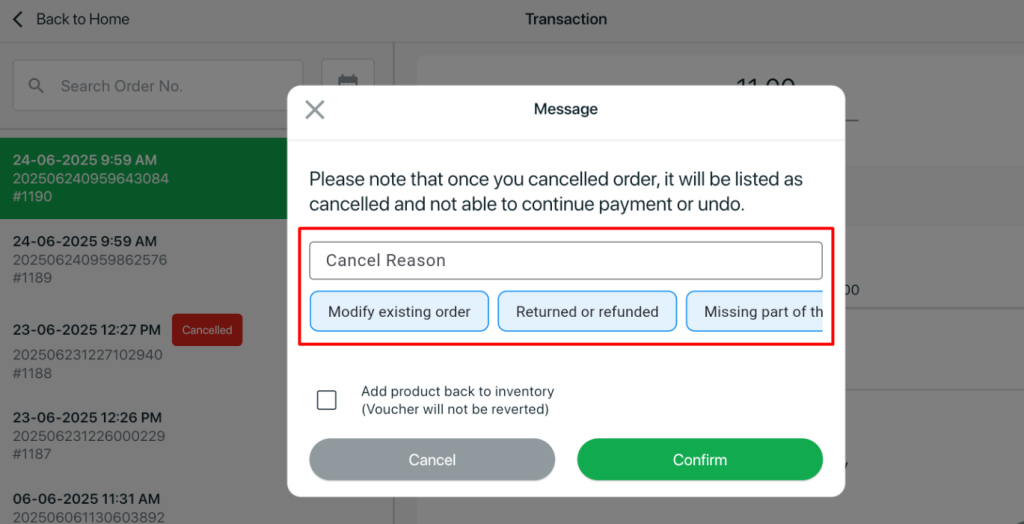
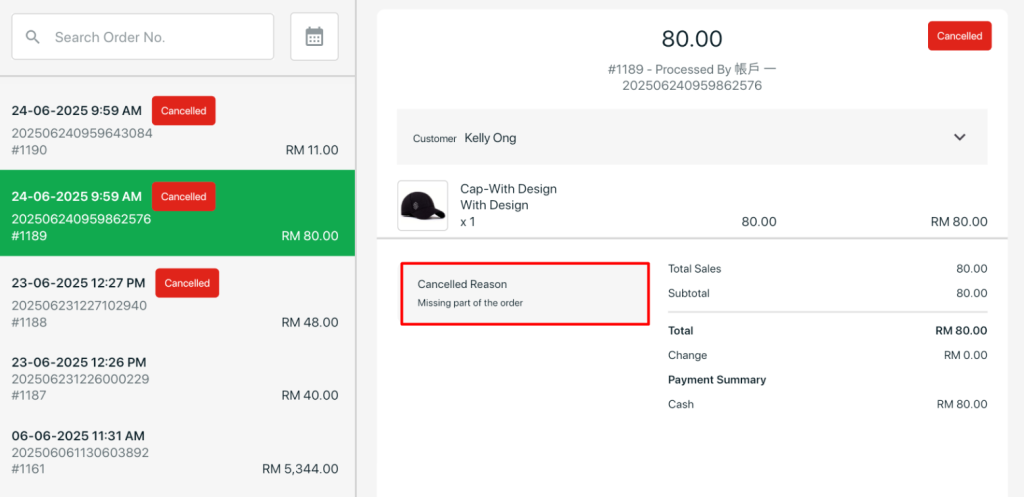
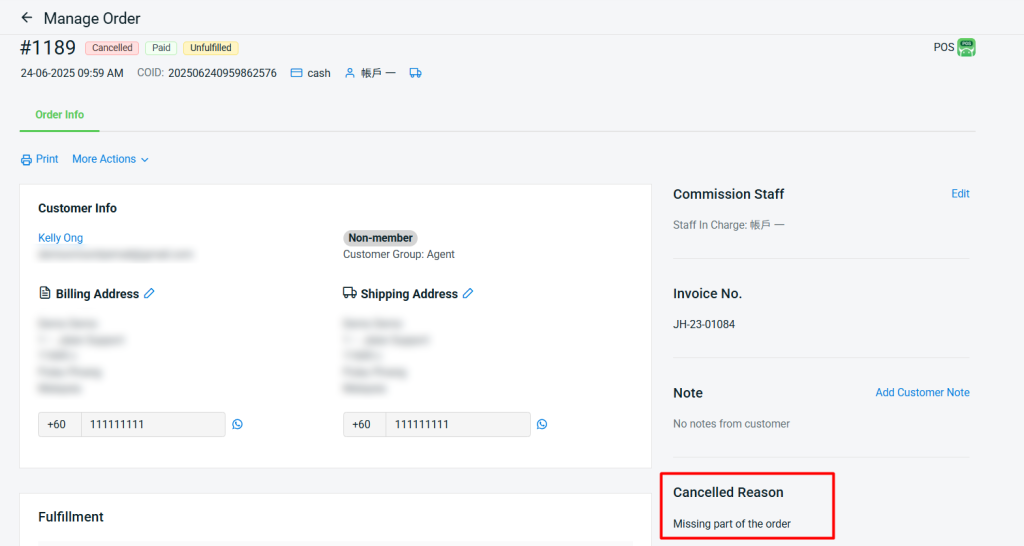
The entered reason will be reflected in both the POS Transaction and ERP Order Details Page. (only applicable for POS orders)
i. POS Transaction
ii. ERP Order Details
7. [Smart Salesman App] Enhanced Features for a Smoother Workflow
We’ve rolled out several new enhancements to the Smart Salesman App, making customer and sales management more seamless than ever.
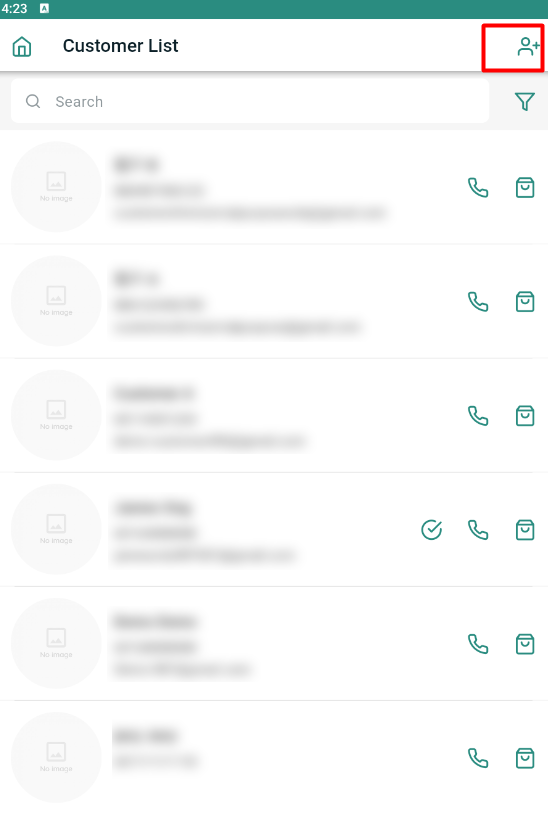
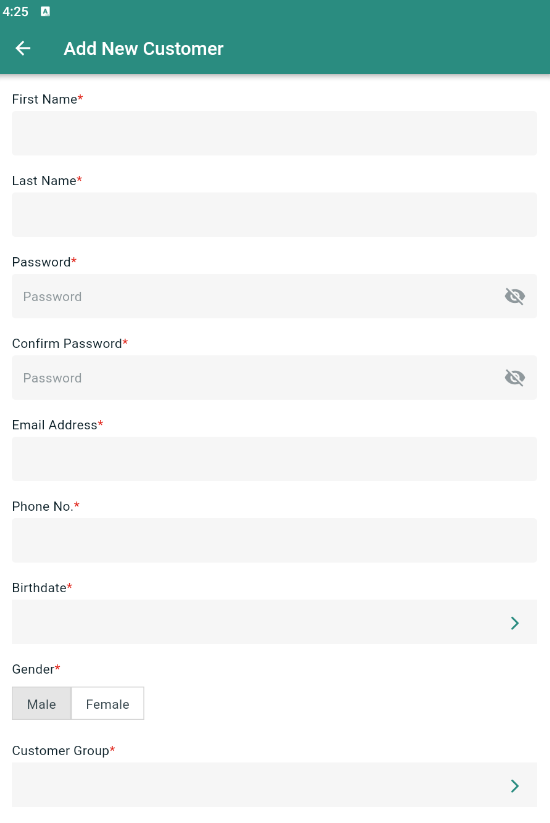
i. Support for creating new customer account
You can now create customer accounts directly in the Smart Salesman App, making it easier to manage customer information on the go.
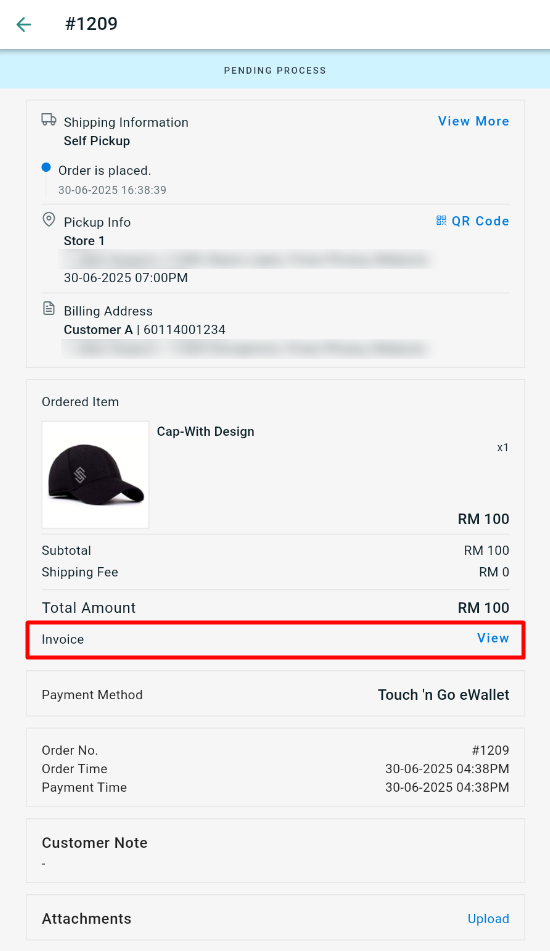
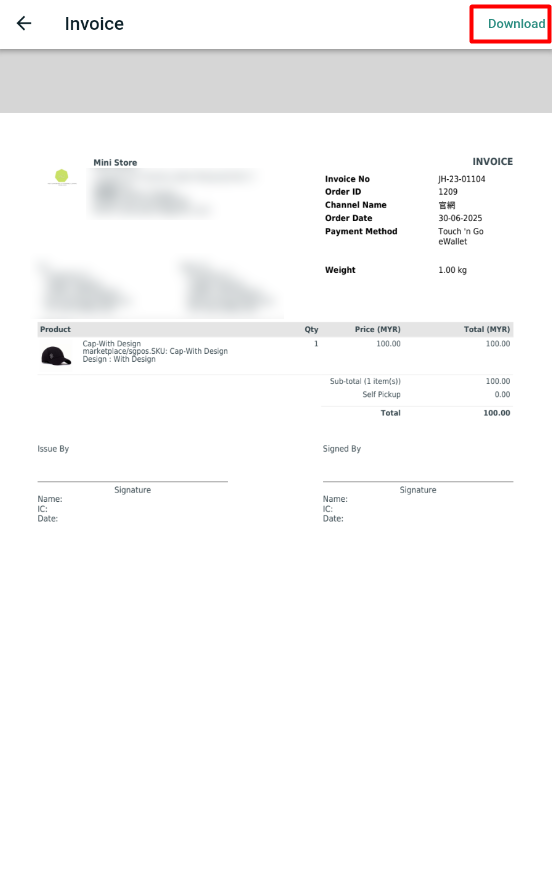
ii. Support for downloading order Invoice in PDF
Easily download order invoices in PDF format from the Smart Salesman App, giving you instant access when customers inquire about them.
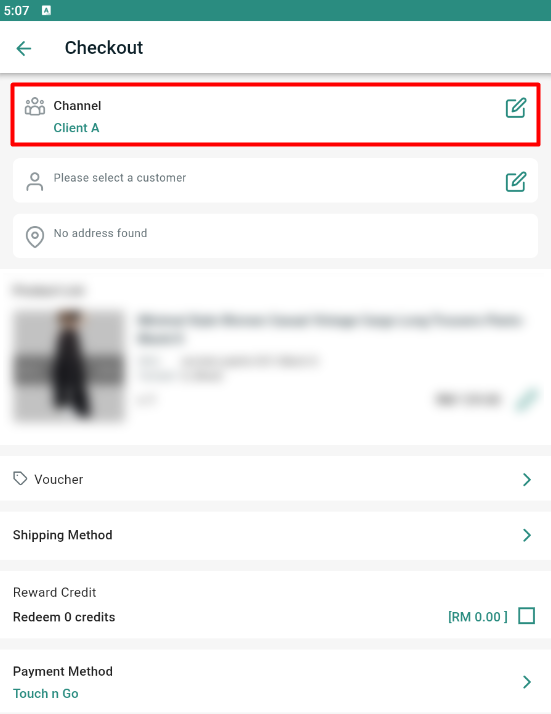
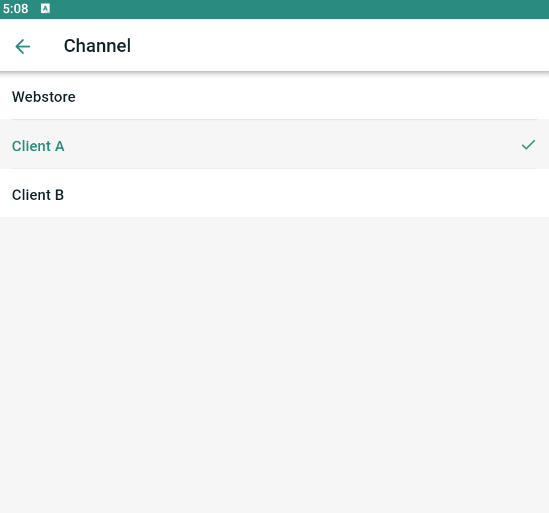
iii. Supports Client Channel at Checkout
You can now place orders in the Smart Salesman App by selecting either the webstore or a client channel during checkout.
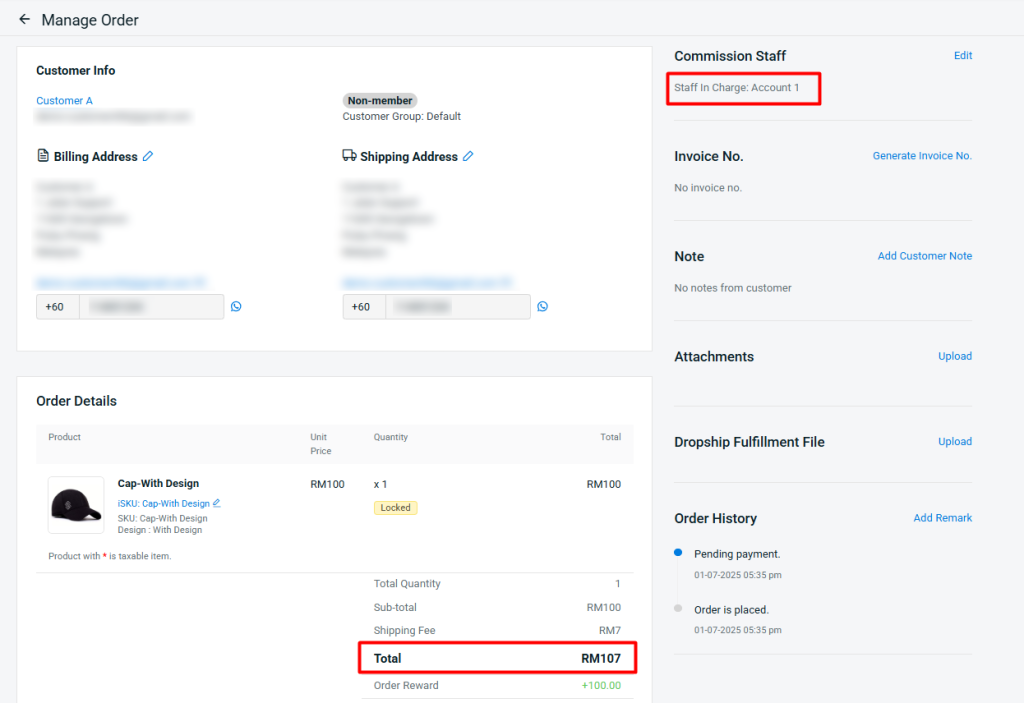
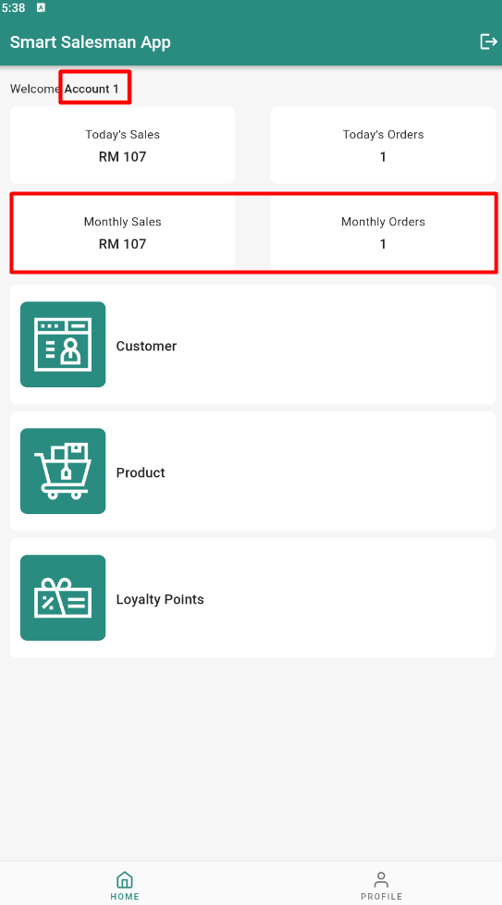
iv. New “Monthly Sales” and “Monthly Orders” in the Dashboard
The Smart Salesman App dashboard now includes “Monthly Sales” and “Monthly Orders”. The figures displayed will only show the order commissions that belong to the respective user.