
With millions of sellers selling on Shopee, driving traffic to your Shopee store is crucial for boosting brand visibility and conversions. Whether you’re a new seller or an established brand on Shopee, increasing traffic can directly lead to higher sales. Hence, using the right strategies such as leveraging Shopee and third-party tools can boost more traffic to your Shopee store and ensure long-term success.
Here are 5 simple ways to increase your Shopee store traffic:
- Leverage Shopee Ads
- Implement Shopee Bump Function
- Participate in Shopee Campaigns
- Utilize Product Watermarks
- Use Shopee Chat Broadcast
1. Leverage Shopee Ads
Firstly, Shopee Ads allow you to target and reach the right audience precisely, based on keywords and buyer interests. Your advertised products and vouchers will appear in high-traffic areas especially the homepage, search results, and product details pages. This significantly increases visibility, attracting more clicks and driving traffic to your Shopee store.
There are 3 types of Shopee Ads you can leverage to boost your Shopee store traffic:
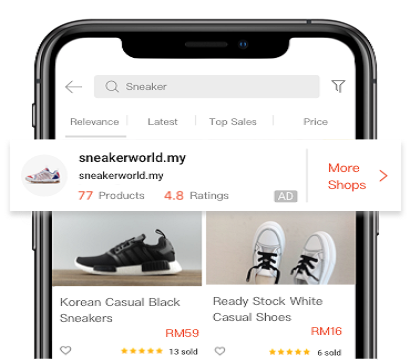
i. Shop Search Ads
Promote your shop, vouchers, and products at the top of search results based on shopper search terms, with customizable images and taglines.
ii. Discovery Ads
Display your products in Shopee’s highly visible sections like “Homepage Daily Discover” and “You May Also Like” sections. This helps your products to reach shoppers who are interested in similar or complementary products.

iii. Product Search Ads
Use targeted keywords to place your products in top positions on Shopee’s search results, making it easier for shoppers to find them.

2. Implement Shopee Bump Function
For a free, organic way to boost your store’s visibility, you can implement the Shopee Bump Function (formerly “Shopee Boost”). This feature temporarily improves your product’s search ranking by moving it to the top of the “Latest” tab in its category. Therefore, this boosts product exposure and drives more traffic to your Shopee store.

However, sellers can bump up to only 5 products every 4 hours. With SiteGiant Shopee AutoBoost, you can automate this process to bump 5 random products every 4 hours.
3. Participate in Shopee Campaigns
Thirdly, joining campaigns like Payday Sales, 11.11 Sales, 12.12 Sales, or Shocking Sales helps showcase your products in the most visited areas of Shopee’s app and website, elevating your store’s presence and traffic.
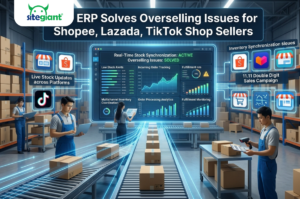
While managing stocks across multiple Shopee stores during campaigns can be challenging, with SiteGiant Inventory Management, you can easily monitor campaign reserved stock to manage inventory more accurately and prevent overselling.

4. Utilize Product Watermarks
Besides, using product watermarks can effectively drive traffic to your Shopee store by enhancing brand recognition and credibility. Adding a clear watermark featuring your logo or store name makes your products stand out, ensuring buyers to easily identify and remember your brand while browsing.
With SiteGiant, you can customize product watermarks to make your products stand out from your competitors. This increases the likelihood of customers returning to make a purchase, helping to build long-term loyalty and drive repeat traffic.

5. Use Shopee Chat Broadcast
Sending personalized messages and promotions to targeted groups such as followers, existing customers and potential buyers through Shopee Chat Broadcast drives more traffic to your store. You can attract repeat traffic and visitors with in-store flash sales, exclusive voucher codes as well as new arrivals to a larger audience quickly.
Additionally, including a clear call-to-action, like “Visit Our Store for More Deals!” encourages shoppers to explore your store, boosting traffic and engagement.

Driving traffic to your Shopee store is key to boosting conversions and sales, and using the right tools can make all the difference. With SiteGiant Marketplace Sync, you can:
- Effortlessly fulfill orders from different Shopee stores and also other marketplaces in bulk from one platform.
- Seamlessly synchronize inventory across multiple Shopee stores and other sales channels in real-time through one centralized system.
- Easily manage and update all product listings from Shopee store, along with other eCommerce platforms using one interface.
Effortlessly boost your Shopee store traffic and offer your customers a smoother, faster, and more efficient eCommerce experience with SiteGiant today!
Image Credits and References: Shopee Seller Education Hub.